
Operation Manual
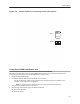
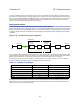
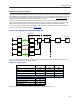
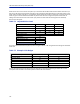
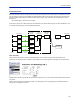
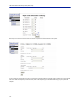
Table Of Contents
- Safety Precautions
- About This Manual
- Table of Contents
- Chapter 1 Introduction
- Chapter 2 System Description
- Chapter 3 Installation guidelines
- Chapter 4 DAS Software Configuration
- Chapter 5 Commissioning
- Chapter 6 RF Commissioning
- Chapter 7 Troubleshooting
- Alarms
- Base Station Gateway (BGW) Alarms
- Fiber Optic Remote (FOR) Alarms
- Remote Unit (RU) Alarms
- Fiber optic Interface (FOI) Alarms
- Base Station Interface (BIU) Alarms
- Medium Power Amplifier (PA) Alarms
- Variable Gain Amplifier (VGA) Alarms
- Analog Pre-distortion (APD) Amplifier Alarms
- Multi-carrier Power Amplifier Interface (MPI) alarms
- Alarms
- Chapter 8 Model Identification

Commissioning
112
Figure 134
1
2
3
4
5
7
6
8
1
2
3
4
5
7
8
6
Top:
Front:
Custom Cable for Connecting to two FOR systems
Connection to BGW from Remote Unit
The technician has the ability to connect to the BGW from the remote unit. This eases troubleshooting and
programming by not having to return to the BGW location for direct access.
1. Enable the laptop DHCP settings.
2. Connect RJ45 Ethernet cable to the Ethernet port on the remote.
The FOI will detect that a device has connected to the FOR and will assign an IP address to the
the laptop in the range of 172.22.108.49-62.
Note: It may take up to 15 minutes for the FOI to assign an IP address to the laptop.
3. Using an Internet browser connect to 172.22.0.1
4. When the login menu appears type in the default credentials:
Username: "extended"
Password: "admin".