
Operation Manual
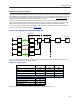
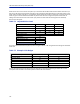
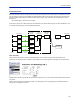
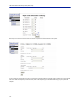
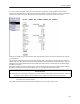
Table Of Contents
- Safety Precautions
- About This Manual
- Table of Contents
- Chapter 1 Introduction
- Chapter 2 System Description
- Chapter 3 Installation guidelines
- Chapter 4 DAS Software Configuration
- Chapter 5 Commissioning
- Chapter 6 RF Commissioning
- Chapter 7 Troubleshooting
- Alarms
- Base Station Gateway (BGW) Alarms
- Fiber Optic Remote (FOR) Alarms
- Remote Unit (RU) Alarms
- Fiber optic Interface (FOI) Alarms
- Base Station Interface (BIU) Alarms
- Medium Power Amplifier (PA) Alarms
- Variable Gain Amplifier (VGA) Alarms
- Analog Pre-distortion (APD) Amplifier Alarms
- Multi-carrier Power Amplifier Interface (MPI) alarms
- Alarms
- Chapter 8 Model Identification

RF Commissioning
118
Turn on the spectrum analyzer, make sure it is connected to the right port on the right BIU and then find the
frequency. A reasonable span is 1 MHz and the receiver band width can be set to 30 kHz or similar. Use the marker
to measure the peak of the signal. Then go to the next screen on the remote unit, the RF Status screen.
What we are looking for here is the Test tone Level. Note this down as well, next to the frequency of the test tone
you noted earlier.
Then check your spectrum analyzer. Assuming your test tone level is -62.6 dBm as in this example your spectrum
analyzer may show -58.2 dBm. Calculating the net gain between the RU and the BIU will then yield -58.2 - -62.5 = 4.3
dB. Subtract the coupler between the BIU and the radio base station which in this example was 15 dB and we get -
19.3 dB as our net gain.
We wanted -10 dB so we have 9.3 dB too low gain. We should then increase the gain and the best place to do this
would be in the remote unit by setting the gain at 35 + 9.3 = 44.3 which we will round to 44 dB.
CAUTION
Turn Off Test Tone
Do not forget to turn off the test tone when you are done with your uplink. Better check one extra time. They will
otherwise interfere with the normal operation of the system by causing noise to the base station.
Note: If the test tone is not manually turned off, the system will automatically turn off test tone after
a 60 minute time limit has elapsed.
That uplink is now finished and we will repeat the settings for all of our uplink, one at a time.