
Operation Manual
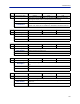
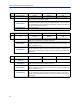
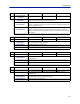
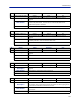
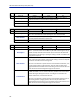
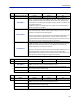
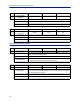
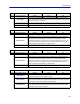
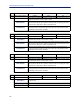
Table Of Contents
- Safety Precautions
- About This Manual
- Table of Contents
- Chapter 1 Introduction
- Chapter 2 System Description
- Chapter 3 Installation guidelines
- Chapter 4 DAS Software Configuration
- Chapter 5 Commissioning
- Chapter 6 RF Commissioning
- Chapter 7 Troubleshooting
- Alarms
- Base Station Gateway (BGW) Alarms
- Fiber Optic Remote (FOR) Alarms
- Remote Unit (RU) Alarms
- Fiber optic Interface (FOI) Alarms
- Base Station Interface (BIU) Alarms
- Medium Power Amplifier (PA) Alarms
- Variable Gain Amplifier (VGA) Alarms
- Analog Pre-distortion (APD) Amplifier Alarms
- Multi-carrier Power Amplifier Interface (MPI) alarms
- Alarms
- Chapter 8 Model Identification

ID Name Class Severity Unit
70 Downlink TX power low 0x0011 Critical RU
Description
The downlink transmitted power is low. This can happen for a number of
reasons: 1) The base station at the BMU may be down and the signal is lost, 2)
The BIU card may have been disconnected. 3) Loss of RF over the fiber while
communication is still working or 4) The gain setting in the DL is insufficient for
the signal level required.
Most of the time this is a configuration error, system error on the BTS side or
connection problem on the BMU
NOC Actions
Check RF input source. Check other units in the same sector if they ha
ve
power. Check fiber optical power. Check the gain setting in the DL corresponds
to what was recorded at commissioning time.
If the unit is connected to a system that has an intermittent RF downlink, such
as some analog s
ystems or paging systems, then this may be a false alarm
triggered when the base station is not transmitting. If that is the case then turn
off this alarm from the RF configuration page on the remote.
Field Actions
Check the RF signal levels in the downlink path. Confirm the connection from
the BMU to the BIU is correct. Confirm the FOI is patched to the correct sector.
Confirm the DL gain settings are correct. If the DL gain is increased is the
problem solved? If so, re-commission the unit.
If the unit is connected to a system that has an intermittent downlink, such as
some analog systems or paging systems, then this may be a false alarm
triggered when the base station is not transmitted. If that is the case then turn
off this alarm from the RF configuration page on the remote.
ID Name Class Severity Unit
71 AGC 0x0011 Warning RU
Description
The automatic level control in the remote unit has reduced the gain more than
10 dB for some time. This is normally configuration error.
NOC Actions
Reduce the gain wit 10 dB and put the unit under observation. Check the
output power from the RF Status page.
Field Actions See actions at NOC.
ID Name Class Severity Unit
71 AGC 0x0011 Error RU
Description
The automatic level control in the remote unit has reduced the gain more than
30 dB for some time. This is normally configuration error.
NOC Actions
Reduce the gain wit 10 dB and put the unit under observation. Check the
output power from the RF Status page.
Field Actions See actions at NOC.
Troubleshooting
126