
Operation Manual
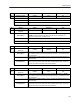
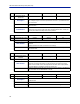
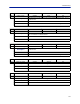
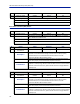
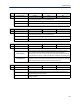
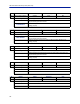
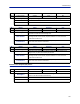

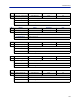
Table Of Contents
- Safety Precautions
- About This Manual
- Table of Contents
- Chapter 1 Introduction
- Chapter 2 System Description
- Chapter 3 Installation guidelines
- Chapter 4 DAS Software Configuration
- Chapter 5 Commissioning
- Chapter 6 RF Commissioning
- Chapter 7 Troubleshooting
- Alarms
- Base Station Gateway (BGW) Alarms
- Fiber Optic Remote (FOR) Alarms
- Remote Unit (RU) Alarms
- Fiber optic Interface (FOI) Alarms
- Base Station Interface (BIU) Alarms
- Medium Power Amplifier (PA) Alarms
- Variable Gain Amplifier (VGA) Alarms
- Analog Pre-distortion (APD) Amplifier Alarms
- Multi-carrier Power Amplifier Interface (MPI) alarms
- Alarms
- Chapter 8 Model Identification

ID Name Class Severity Unit
56
Received optical
power lost
0x0020 Critical FOI
Description
Alarm is triggered when the optical power received on the fiber is < 20 μW.
This is likely to happen if the RU is powered off or there is a problem with the
fiber connection.
NOC Actions
Check if there is a power problem. If that is not the case dispat
ch field tech to
check the fibers.
Field Actions
Go to remote connected to the FOI and check for power problems. At the
remote you may connect locally and check received optical levels. If they are
also low, then fiber is the likely cause of the problem.
ID Name Class Severity Unit
57 Low downlink RF power 0x0020 Warning FOI
Description The input RF signal is too low to the FOI.
NOC Actions
Check inputs on BIU cards. Check attenuator settings from commissioning
protocols.
Dispatch field tech to check connections and settings.
Field Actions
Check the settings of the system. If all seems fine there could be a problem
with the FOI card.
ID Name Class Severity Unit
58
Downlink RF power
overload
0x0020 Warning FOI
Description The downlink RF power in to the laser is too high.
NOC Actions
Check the input levels on the FOI board. It is possible to readjust this on from
remote by increasing attenuation on the FOI board. Also check the output
power on the remote units as this adjustment will lower their output power.
Recommended also a field tech checks the system out.
Field Actions
Check the settings of the FOI card. The input is too high. Adjust as needed and
then reset levels on the affected RUs in the DL.
ID Name Class Severity Unit
59 Uplink 5V low 0x0020 Error FOI
Description
The measured 5 V to RF parts on the board is below acceptable level. This is a
hardware fault.
NOC Actions Dispatch tech to replace board.
Field Actions Replace FOI card. Commission new card with the same settings as the old.
Fiber Distributed Antenna System (Fiber DAS)
131