
Operation Manual
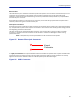
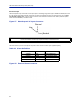


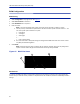
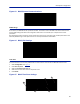
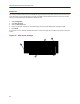
Table Of Contents
- Safety Precautions
- About This Manual
- Table of Contents
- Chapter 1 Introduction
- Chapter 2 System Description
- Chapter 3 Installation guidelines
- Chapter 4 DAS Software Configuration
- Chapter 5 Commissioning
- Chapter 6 RF Commissioning
- Chapter 7 Troubleshooting
- Alarms
- Base Station Gateway (BGW) Alarms
- Fiber Optic Remote (FOR) Alarms
- Remote Unit (RU) Alarms
- Fiber optic Interface (FOI) Alarms
- Base Station Interface (BIU) Alarms
- Medium Power Amplifier (PA) Alarms
- Variable Gain Amplifier (VGA) Alarms
- Analog Pre-distortion (APD) Amplifier Alarms
- Multi-carrier Power Amplifier Interface (MPI) alarms
- Alarms
- Chapter 8 Model Identification

Installation guidelines
62
Ethernet Port
The RJ45 Ethernet port is located on the bottom panel of the repeater unit. Connection of the Ethernet port is not
required for normal operation of the repeater. The port offers convenient access to the system GUI during
installation, commissioning and troubleshooting. Ensure the provided IP67 rated protective cap is replaced when
the Ethernet port is not in use.
If the Ethernet connection is to be long term or permanent, ensure tha
t the appropriate Ethernet patch cable is
utilized to prevent the ingress of moister into the port.
Fiber Optic Connection
If the fiber optic option is ordered, the fiber connection on the bott
om of the repeater has an IP67 rated protective
cap. The protective cap must remain in place until the fiber is to be inserted. This will help prevent foreign particles
from degrading performance of the fiber.
The fiber connection has a keyed slot SC/APC connection. Care must be t
aken to ensure the fiber is installed
correctly. It is possible to force the connection so that the fiber is installed at a 180 degree rotation causing
performance issues.
Note: The SC/APC key is at the top and bottom on the connection on the repeater
.
Figure 55 Remote Fiber-Optic Connector
Keyed
Connector
It is highly recommended that only the SCRJ fiber cables be used with the repeaters. Not only does the SCRJ cable
prevent the ingress of moisture and dust into to the fiber port but the cable also insures the fibers are correctly
aligned in the connector. SCRJ fiber cables are ordered separately from Bird Technologies.
Figure 56 SCRJ Connector