
Operation Manual

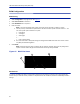
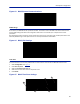
Table Of Contents
- Safety Precautions
- About This Manual
- Table of Contents
- Chapter 1 Introduction
- Chapter 2 System Description
- Chapter 3 Installation guidelines
- Chapter 4 DAS Software Configuration
- Chapter 5 Commissioning
- Chapter 6 RF Commissioning
- Chapter 7 Troubleshooting
- Alarms
- Base Station Gateway (BGW) Alarms
- Fiber Optic Remote (FOR) Alarms
- Remote Unit (RU) Alarms
- Fiber optic Interface (FOI) Alarms
- Base Station Interface (BIU) Alarms
- Medium Power Amplifier (PA) Alarms
- Variable Gain Amplifier (VGA) Alarms
- Analog Pre-distortion (APD) Amplifier Alarms
- Multi-carrier Power Amplifier Interface (MPI) alarms
- Alarms
- Chapter 8 Model Identification

Fiber Distributed Antenna System (Fiber DAS)
67
BGW Configuration
BGW Naming
1. Select Configuration in top right corner. See
Figure 62
.
2. Select External Comm in left menu.
3. Select BGW Name tab in top menu.
4. Enter site name:
Note: The name must begin with a letter, the name cannot start with a number or a dash.
a. You may use any combination of alphanumeric characters and the special character of dash "-". Do
not use any other special characters or space.
0 through 9
a through z
A through Z
-
Limit of 56 characters
b. Use a site name that is descriptive enough to distinguish the BGW from other sites. Generic names
may delay troubleshooting efforts.
5. Click Submit.
Note: After the new host name is entered, the unit must be restarted. This is the only change that
requires a restart. Select the physical restart button on the left side of the BGW.
Figure 62 BGW Site Name
1
5
4
3
2
EXT Ethernet
In order for the BGW to be able to communicate outward, the Ext Ethernet connection has to be programmed.
Consult with your Internet service provider or IT department for the IP address, Netmask and Gateway IP address
settings.