
Operation Manual
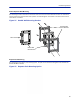
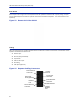
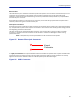
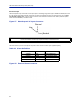

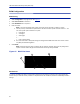
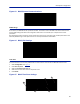
Table Of Contents
- Safety Precautions
- About This Manual
- Table of Contents
- Chapter 1 Introduction
- Chapter 2 System Description
- Chapter 3 Installation guidelines
- Chapter 4 DAS Software Configuration
- Chapter 5 Commissioning
- Chapter 6 RF Commissioning
- Chapter 7 Troubleshooting
- Alarms
- Base Station Gateway (BGW) Alarms
- Fiber Optic Remote (FOR) Alarms
- Remote Unit (RU) Alarms
- Fiber optic Interface (FOI) Alarms
- Base Station Interface (BIU) Alarms
- Medium Power Amplifier (PA) Alarms
- Variable Gain Amplifier (VGA) Alarms
- Analog Pre-distortion (APD) Amplifier Alarms
- Multi-carrier Power Amplifier Interface (MPI) alarms
- Alarms
- Chapter 8 Model Identification

DAS Software Configuration
68
Figure 63 BGW External Communications
VPN Settings
On occasions, the BGW will be set up behind a firewall. To be able to access the BGW from external locations the
Primary BGW settings will need to be configured to allow access. Consult with your IT department for these
parameters.
Bird Technologies offers monitoring services. When these services are contracted, enter the Bird parameters in the
Secondary BGW settings so that system alarms are correctly forwarded to the Bird NOC.
Figure 64 BGW VPN Settings
Time Zone
To ensure that alarms are correctly labeled with the local time the time zone for the BGW will need to be set.
1. Select Configuration. See
Figure 65
.
2. Click Time serv/zone.
3. Select the Time and Time zone Tab.
4. Select the local time zone from the drop-down menu.
5. Click Submit.
Figure 65
1
5
4
3
2
BGW Time Zone Settings