
Operation Manual
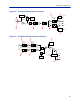
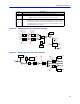
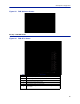
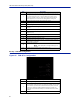
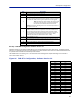
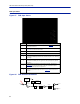
Table Of Contents
- Safety Precautions
- About This Manual
- Table of Contents
- Chapter 1 Introduction
- Chapter 2 System Description
- Chapter 3 Installation guidelines
- Chapter 4 DAS Software Configuration
- Chapter 5 Commissioning
- Chapter 6 RF Commissioning
- Chapter 7 Troubleshooting
- Alarms
- Base Station Gateway (BGW) Alarms
- Fiber Optic Remote (FOR) Alarms
- Remote Unit (RU) Alarms
- Fiber optic Interface (FOI) Alarms
- Base Station Interface (BIU) Alarms
- Medium Power Amplifier (PA) Alarms
- Variable Gain Amplifier (VGA) Alarms
- Analog Pre-distortion (APD) Amplifier Alarms
- Multi-carrier Power Amplifier Interface (MPI) alarms
- Alarms
- Chapter 8 Model Identification

Fiber Distributed Antenna System (Fiber DAS)
87
RF Strip 1 XXX MHz Configuration
Figure 95 FOR RF 1 Configuration
1
2
3
4
5
6
7
8
9
10
11
7
The amount of actual gain used by the system. Might not achieve max g
ain
setting if ALC is in operation. If the set gain is 56 as it is above, RF is turned
on and the actual gain in line 7 is less than 56 then the system is being
overdriven and ALC is kicking in. Reduce gain. Suggest starting with the
value displayed in line 7 since this is the most gain that is being used.
8 Output power of the amplifier for the path under review.
9 Uplink frequency band for the RF path/strip selected
10 RF link setting for the uplink path: On or Off.
11
Status of uplink test tone signal. Test tone automatically turns off after 60
minutes.
12 Uplink test tone frequency setting.
13
Uplink test tone level. Not adjustable. Accounts for losses in internal
duplexers, if any.
14 Uplink ALC threshold setting.
15 Gain setting in the uplink path.
16 Maximum allowed gain set by the system.
17
Actual gain being used in the uplink path. The figure might not match gain
setting if ALC is in operation.
18
Uplink output to the FOI.
Note: If the uplink path is set to Off a reading of “<“ is
returned.
19 Periodic enables a constant update of the status screen.
Item Description
1 Downlink gain setting for RF path under review.
2
Downlink ALC setting for RF path under review. The factory default is set at
the rated power of the remote unit (i.e. DDH is set to 43dB). The level could
be set lower for specific situations. Note that the factory level is set at the
antenna port. If remote is shutting down due to being over driven it is
suggested to reduce the ALC level by one or two dB to reduce the number
of alarms.
3 Turns downlink RF on or off.
Item Description