
Specifications

724-746-5500 | blackbox.com
Chapter 3: Installation
Page 12
3.2 Installation Instructions
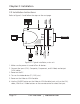
Refer to Figure 3-2 and follow the steps on the next page.
Figure 3-2. Typical installation, main unit.
1. Make sure the power is turned off on all devices.
2. Connect the input (VGA, Composite, Component, and S-Video) and output
(VGA) cables.
3. Power on the PC.
4. Turn on the video devices (TV, DVD, etc.).
5. Power on the Video to VGA Portable.
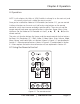
6. Use the SOURCE button on the Video to VGA Portable (main unit) or the VGA,
video, Y.Pb.Pr or S-Video buttons on the remote control to select the input.