
Specifications

724-746-5500 | blackbox.com
Chapter 4: Operation
Page 15
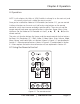
NOTE: On the main unit, you will use the UP/DOWN buttons to scroll through menu
options. On the remote control, you’ll use the p, q, t, u buttons for
scrolling.
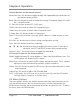
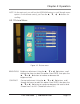
4.2.1 Picture Menu
Figure 4-2. Picture menu.
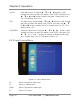
BRIGHTNESS: Brightness adjustment. Using the p, q or t, u buttons, scroll
through the menu to select this option. Press ENTER, then press the
p, q or t, u button to increase or decrease the
brightness level.
CONTRAST: Contrast adjustment. Using the p, q or t, u buttons, scroll
through the menu to select this option. Press ENTER, then press the
p, q or t, u button to increase or decrease the contrast level.
Choose from 0 to 100. (The default value is 50.)