
Operating instructions


29
DEUTSCH
ENGLISCH
FRANÇAIS
ITALIANO
ESPAÑOL
PORTUGUÊS
NEDERLANDS
SVENSKA
NORGE
SUOMI
TÜRKÇE
Setup menu
You can configure the DVD player in the
setup menu.
Opening the setup menu
If there is a DVD playing in the unit, stop
it playing.
➮ Press the STOP button >.
To open the SETUP menu:
➮ Press the SETUP button F.
Note:
If you interrupted playback in order to
access the SETUP menu, you can
resume playback when you close the
SETUP menu by pressing the PLAY
button ?.
Selecting the language for the
on-screen display
Open the SETUP menu.
➮ Press the 7/ E buttons to
select the “LANGUAGE” menu
item.
➮ Confirm your choice by pressing
the ENTER button H.
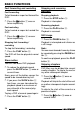
The language menu appears. The cur-
rent language will be displayed next to
the “OSD LANGUAGE” menu item.
If you want to set another language:
➮ Press the 7/ E buttons to
select the “OSD LANGUAGE”
menu item.
➮ Confirm your choice by pressing
the ENTER button H.
The languages that are available for the
on-screen display will appear.
➮ Press the 7/ E buttons to
select the required language.
➮ Confirm your choice by pressing
the ENTER button H.
You will return to the languages menu.
Your chosen language will now appear
next to the “OSD LANGUAGE” menu
item.
➮ Press the RETURN button : to
return to the SETUP menu
➮ Press the RETURN button : a
second time to close the SETUP
menu.
Selecting the playback language
➮ Open the SETUP menu.
➮ Press the 7/ E buttons to
select the “LANGUAGE” menu
item.
➮ Confirm your choice by pressing
the ENTER button H.
The language menu appears. The cur-
rent language will be displayed next to
the “AUDIO” menu item.
If you want to set another language:
➮ Press the 7/ E buttons to
select the “AUDIO” menu item.
➮ Confirm your choice by pressing
the ENTER button H.
The available playback languages will
appear.
➮ Press the 7/ E buttons to
select the required language.
SETUP MENU