
Operating instructions

iClock 10
9
Radio operation
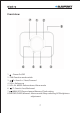
Manual Tuner or Auto matic Tuner:Press
/T- / /T+” for manual tuner, while
press “ /T- / /T+”and hold it for two seconds when enter to automatic tuner.
The tuner will st op automat ically when get access to channels.
Manual channel memory: when get acess t o the channels by ma nual, press
“ /MEM/SET”and hold for a while. Press “ /T- / /T+” to choose the saving
location. 20 channles can be memorized and sav ed.
Memory selection:Press “ /MEM/SET”to alter nate the memor y channel.
Timing setting
1. Hold and press “ /MEM/SET”key around 2 seconds, “24H” charac ters are flashing
on LCD screen, enter into 12/24H system option, t hen c lick press “ /T- /
/T+”k ey to select ”12/24” system, finally click press “ /MEM/SET” key to
confirm, which enters into time setting.
2. Ent er into the time setting mode, set the hour first, click press “ /T- /
/T+”k ey to select preset hour, finally click press “ /MEM/SET”k ey to confir m,
then use the same methods to set the minutes.
Alarm clock setting
When it’s in STAND By stat us, hold and press“VOL-/AL MODE”key to enter into setting,
then display clock, “Hour” digits are flashing on LCD, and clic k pr ess “ /T- / /T+”
key to adjust t he hour, click press “VOL-/AL MODE” key to confirm, then “Minute” digits
ar e flashing on LC D, and clic k press“ /T- / /T+” key to adjust the minutes, click
press “VOL-/A L MODE” key to confirm t he setting and return to clock status.