
Operating instructions

Power On
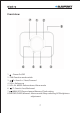
1. After plugging DC5V AC adapter into DC power input jack at the back of the
unit, then the display screen lightens, clock appears on the screen, then click
press “ ” to power on.
2. Volume: VOL- and VOL+ can be adjusted within 00-20.
Play music
IPHONE: The music station will enter to ”IPHONE” function directly when
power on. Dock IPHONE/IPOD on the iPhone/iPod dock, and play the music
from IPHONE/IPOD. (IPOD/IPHONE can be changed when the main unit
connects to power)
Pause: Under “IPHONE/IPOD” mode, press “ ”for pause. (Note: there is no
“ ”on the IP19 LCD when “IPHONE/IPOD”is played or paused, but on the
IPHONE/IPOD itself ).
Music selection: Press “ /T- / /T+”for music selection when
“IPHONE/IPOD”is played or paused.
Rewind/Forward: Press " / T- / /T+”and hold it for rewind or
forward when “IPHONE/IPOD”is played or paused.
IPHONE Incoming call alert: If IPHONE plays music, a call is incoming, the
unit will auto switch, stop playing music and switching into call music, when
auto hang up, it will return to music playing.
Time synchronization function between the main unit and iPhone/iPod:
Under the state of power-on or power-off, plug iPhone/iPod, the main unit
can synchronize the current time on iPhone/iPod.
LINE operation: Select AUX under power on,and input the external music
source to AUX,turn on volume and the music is ready.
iClock 10
8
GENERAL OPERATION