
Quick Reference Guide

HEX70SL-KIT QUICK REFERENCE GUIDE
www.blustream.com.au | www.blustream.co.uk
02
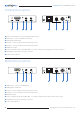
TX Panel Descriptions
1 EDID Selection Button – Cycle through the EDID modes
2 HDMI input - connect to HDMI source device
3 HDMI signal link indicator
4 IR input - connect to Blustream 5V 3.5mm IR receiver
5 IR output - connect to Blustream 5V 3.5mm IR emitter
6 HDBaseT™ output
7 Power over Cable (PoC) switch (ON / OFF) - to enable / disable PoC being sent from the transmitter
8 12V/1A DC power input screw type connector
9 Power status indicator
1 HDMI output - connect to HDMI display
2 HDMI signal link indicator
3 IR input - connect to Blustream 5V 3.5mm IR receiver
4 IR output - connect to Blustream 5V 3.5mm IR emitter
5 HDBaseT™ input
6 Power over Cable (PoC) switch (ON / OFF) - to enable or disable PoC being sent from the receiver
7 12V/1A DC power input screw type connector
8 Power status indicator
4
4
5
5
6
6
7
7
RX Panel Descriptions
2
2
1
1
8
8
93
3