
Programming instructions


16
PCMCPU
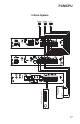
3-Zone System with One-Way Paging & Single Amp BGM
The application illustrated on the next page shows the simplest PCM2000 system
configuration. A single amplifier supplies both paging and BGM to passive speakers.
As a result, BGM is lost in all zones when a page is made (this feature must be
enabled. See "1 Amp BGM" in the Programming section of the PCMTIM manual).
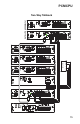
Connect the low-level BGM source to the PCMTIM terminals marked BGM SRC IN
and RT. Connect the paging amplifier's input to the terminals marked PA IN
and RT. Connect the paging amplifier's output to the terminals marked PA OUT and
RT. The OUTPUT switch on the PCMZPM must be in the HI PWR position for this
application.
Connect the passive speakers to the PCMZPM zone terminals. The GLOBL BGM
jumpers should be in the IN position. The jumpers for any zone that is to have BGM
should also be in the IN position. Set the paging level using the amplifier's volume
control and the BGM level using the BGM SRC VOLUME control on the PCMTIM.
NOTE: The Bogen PCM Configuration Guide contains more detailed
information on applications. It can be downloaded at:
www.bogen.com/products/pdfs/telephonepagepdfs/PCM2000c.pdf