
User manual
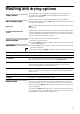
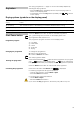
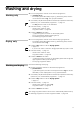
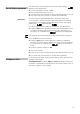

17
Washing and drying
Washing only
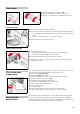
Turn the programme selector to the desired programme,
e.g. Cottons 60°C.
– The display panel alternately shows 2 (Remaining time) and the
recommended load in kg. The % symbol flashes.
If necessary, adjust the temperature and the spin speed and select any
options for your individualised programme, –> page15.
–The Dry function must not be activated.
Load the laundry –> page10.
– Observe the maximum load,
Programme table –> page30.
Press the Start/Pause button.
– 2 (Remaining time) is shown on the display panel.
The % (Programme start) symbol lights up.
– The washing programme starts.
Drying only
Turn the programme selector to the desired drying programme.
– The display panel alternately shows 2 (Remaining time) and the
recommended load in kg.
Press the Dry button to set the drying options
–> page16
– If you do not make a selection, the e (Cupboard-dry) option is set.
Load the laundry –> page10.
– Observe the maximum load,
Programme table –> page30.
Press the Start/Pause button.
– 2 (Remaining time) is shown on the display panel and the 5 and
% (Programme start) symbols light up.
– The drying programme starts.
Washing and drying
Successive washing and drying.
Set the programme selector to the desired programme,
e.g.Cottons 60°C.
– 2 (Remaining time) and the recommended load in kg are shown
alternately on the display panel. The % symbol flashes.
If necessary, adjust the temperature and the spin speed and select any
options for your individualised programme, –> page15.
Press the Dry button to set the
drying options
–> page16
Load the laundry –> page10.
– Observe the maximum load in kg,
Programme table –> page30.
Press the Start/Pause button.
The drying programme that is carried out is automatically determined by
the washing programme, see the Programme table –> page30.
i
i
i