
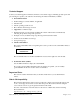
Technical data
Fabric OS v6.1.0_del1 Release Notes, v1.0 Page 10 of 13
Brocade Access Gateway Administrator’s Guide (Publication Number 53-1000605-02)
Chapter 3, Connecting Devices Using Access Gateway, page 33
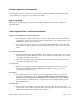
Add the following note after the procedure, “Enabling NPIV on the M-EOS switch”
Note: You can run the agshow command to display Access Gateway information registered with
the fabric. When an Access Gateway is exclusively connected to Non-FOS based switches, it will
not show up in the " agshow " output on other Brocade Switches in the fabric.
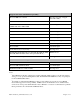
On page 52, in Table 9, correct port mapping table information for Brocadce 4424 and add model M5424 to
model reference alongside 4424 as shown below.
Brocade Total Ports F_Ports N_Ports Default F_ to N_Port Mapping
Model
4424 / M5424 24 1-16 17-23, 0 17-23, 0 as N-Port with failover
enabled, failback enabled
1, 2 mapped to 17
3, 4 mapped to 18
5, 6 mapped to 19
7, 8 mapped to 20
9, 10 mapped to 21
11, 12 mapped to 22
13, 14 mapped to 23
15, 16 mapped to 0