
User Manual v12.3.0 Owner manual

Brocade Network Advisor SAN + IP User Manual 1615
53-1003155-01
SAN historical performance data
43
Disabling historical performance collection
Perform the following steps to disable historical performance collection on all fabrics.
1. Select Monitor > Performance > Historical Data Collection.
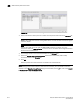
The Fabric Selector dialog box displays.
2. Select Disable All.
Historical performance data collection is disabled for all fabrics in the SAN.
Generating and saving a historical performance graph
The Historical Performance Graph is available through the SAN tab or through the IP tab if you
select SAN devices. If selecting through the IP tab, refer to “Configuring the performance graph
display” on page 1656.
To generate a historical performance graph for a device, complete the following steps.
1. Select the device for which you want to generate a performance graph.
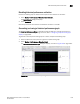
2. Select Monitor > Performance > Historical Graph.
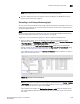
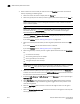
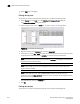
The Historical Performance Graph dialog box displays, as shown in Figure 728 on page 1615.
FIGURE 728 Historical Performance Graph dialog box