
User Manual

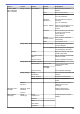
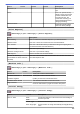
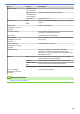

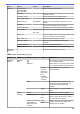


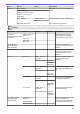
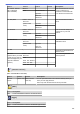
Table Of Contents
- Online User's Guide MFC-J6545DW/MFC-J6945DW/MFC-J6947DW
- Table of Contents
- Before You Use Your Brother Machine
- Introduction to Your Brother Machine
- Paper Handling
- Print
- Print from Your Computer (Windows)
- Print a Photo (Windows)
- Print a Document (Windows)
- Cancel a Print Job (Windows)
- Print More Than One Page on a Single Sheet of Paper (N in 1) (Windows)
- Print as a Poster (Windows)
- Print on Both Sides of the Paper Automatically (Automatic 2-sided Printing) (Windows)
- Print as a Booklet Automatically (Windows)
- Secure Print (Windows)
- Print a Colour Document in Greyscale (Windows)
- Prevent Smudged Printouts and Paper Jams (Windows)
- Use a Preset Print Profile (Windows)
- Change the Default Print Settings (Windows)
- Print Settings (Windows)
- Print from Your Computer (Mac)
- Print a Photo (Mac)
- Print a Document (Mac)
- Print on Both Sides of the Paper Automatically (Automatic 2-sided Printing) (Mac)
- Print More Than One Page on a Single Sheet of Paper (N in 1) (Mac)
- Secure Print (Mac)
- Print a Colour Document in Greyscale (Mac)
- Prevent Smudged Printouts and Paper Jams (Mac)
- Print Options (Mac)
- Print Data Directly from a USB Flash Drive
- Print from Your Computer (Windows)
- Scan
- Scan Using the Scan Button on Your Brother Machine
- Scan Multi-page Letter or A4 Size Documents
- Scan Photos and Graphics
- Save Scanned Data to a Folder as a PDF File
- Save Scanned Data to a USB Flash Drive
- Scan Multiple Business Cards and Photos (Auto Crop)
- Scan to an Editable Text File Using OCR
- Scan to Email Attachment
- Send Scanned Data to an Email Server
- Scan to FTP
- Scan to SSH FTP (SFTP)
- Scan to Network (Windows)
- Scan to SharePoint
- Web Services for Scanning on Your Network (Windows 7, Windows 8 and Windows 10)
- Change Scan Button Settings from ControlCenter4 (Windows)
- Change Scan Button Settings from Brother iPrint&Scan (Mac)
- Scan from Your Computer (Windows)
- Scan Using ControlCenter4 Home Mode (Windows)
- Scan Using ControlCenter4 Home Mode (Windows)
- Select Document Type Using ControlCenter4 Home Mode (Windows)
- Change Scan Size Using ControlCenter4 Home Mode (Windows)
- Crop a Scanned Image Using ControlCenter4 Home Mode (Windows)
- Print Scanned Data Using ControlCenter4 Home Mode (Windows)
- Open with an Application Using ControlCenter4 Home Mode (Windows)
- Save Scanned Data to a Folder as a PDF File Using ControlCenter4 Home Mode (Windows)
- Scan Both Sides of a Document Automatically Using ControlCenter4 Home Mode (Windows)
- Scan Settings for ControlCenter4 Home Mode (Windows)
- Scan Using ControlCenter4 Home Mode (Windows)
- Scan Using ControlCenter4 Advanced Mode (Windows)
- Scan Photos and Graphics Using ControlCenter4 Advanced Mode (Windows)
- Save Scanned Data to a Folder as a PDF File Using ControlCenter4 Advanced Mode (Windows)
- Scan Both Sides of a Document Automatically Using ControlCenter4 Advanced Mode (Windows)
- Scan Both Sides of an ID Card Using ControlCenter4 Advanced Mode (Windows)
- Scan to Email Attachment Using ControlCenter4 Advanced Mode (Windows)
- Scan to an Editable Text File (OCR) Using ControlCenter4 Advanced Mode (Windows)
- Scan to an Office File Using ControlCenter4 Advanced Mode (Windows)
- Scan Settings for ControlCenter4 Advanced Mode (Windows)
- Scan Using Nuance™ PaperPort™ 14SE or Other Windows Applications
- Scan Using Windows Fax and Scan
- Install BookScan Enhancer and Whiteboard Enhancer (Windows)
- Scan Using ControlCenter4 Home Mode (Windows)
- Scan from Your Computer (Mac)
- Configure Scan Settings Using Web Based Management
- Scan Using the Scan Button on Your Brother Machine
- Copy
- Fax
- Send a Fax
- Send a Fax from Your Brother Machine
- Send a 2-sided Fax from the ADF
- Send a Fax Manually
- Send a Fax at the End of a Conversation
- Send the Same Fax to More than One Recipient (Broadcasting)
- Send a Fax in Real Time
- Send a Fax at a Specified Time (Delayed Fax)
- Change the Fax Auto Redial Setting
- Cancel a Fax in Progress
- Check and Cancel a Pending Fax
- Fax Options
- Receive a Fax
- Voice Operations and Fax Numbers
- Telephone Services and External Devices
- Fax Reports
- PC-FAX
- PC-FAX for Windows
- PC-FAX Overview (Windows)
- Configure PC-FAX (Windows)
- Configure your PC-Fax Address Book (Windows)
- Add a Member to your PC-FAX Address Book (Windows)
- Create a Group in your PC-FAX Address Book (Windows)
- Edit Member or Group Information in your PC-FAX Address Book (Windows)
- Delete a Member or Group in your PC-FAX Address Book (Windows)
- Export your PC-FAX Address Book (Windows)
- Import Information to your PC-FAX Address Book (Windows)
- Send a Fax Using PC-FAX (Windows)
- Receive Faxes on Your Computer (Windows)
- PC-FAX Overview (Windows)
- PC-FAX for Mac
- PC-FAX for Windows
- Send a Fax
- Network
- Configure Network Details Using the Control Panel
- Supported Basic Network Features
- Learn about Network Management Software and Utilities
- Additional Methods of Configuring Your Brother Machine for a Wireless Network
- Before Configuring Your Brother Machine for a Wireless Network
- Configure Your Machine for a Wireless Network Using the One Push Method of Wi-Fi Protected Setup™ (WPS)
- Configure Your Machine for a Wireless Network Using the PIN Method of Wi-Fi Protected Setup™ (WPS)
- Configure Your Machine for a Wireless Network When the SSID is Not Broadcast
- Configure Your Machine for an Enterprise Wireless Network
- Use Wi-Fi Direct®
- Print or Scan from Your Mobile Device Using Wi-Fi Direct
- Configure Your Wi-Fi Direct Network
- Wi-Fi Direct Network Configuration Overview
- Configure Your Wi-Fi Direct Network Using the One-Push Method
- Configure Your Wi-Fi Direct Network Using the One-Push Method of Wi-Fi Protected Setup™ (WPS)
- Configure Your Wi-Fi Direct Network Using the PIN Method
- Configure Your Wi-Fi Direct Network Using the PIN Method of Wi-Fi Protected Setup™ (WPS)
- Configure Your Wi-Fi Direct Network Manually
- Advanced Network Features
- Print the Network Configuration Report
- Fax Using the Internet (I-Fax)
- Configure and Operate LDAP Search
- Synchronize Time with the SNTP Server Using Web Based Management
- Technical Information for Advanced Users
- Security
- Before Using Network Security Features
- Secure Function Lock 3.0
- Before Using Secure Function Lock 3.0
- Configure Secure Function Lock 3.0 Using Web Based Management
- Scan Using Secure Function Lock 3.0
- Configure Public Mode for Secure Function Lock 3.0
- Additional Secure Function Lock 3.0 Features
- Register a new IC Card Using Machine's Control Panel
- Register an External IC Card Reader
- Use Active Directory Authentication
- Use LDAP Authentication
- Manage Your Network Machine Securely Using SSL/TLS
- Certificates and Web Based Management
- Supported Security Certificate Features
- Create and Install a Certificate
- Manage Multiple Certificates
- Certificates and Web Based Management
- Manage Your Network Machine Securely Using IPsec
- Send an Email Securely
- Send or Receive an Email Securely
- Use IEEE 802.1x Authentication for a Wired or a Wireless Network
- Mobile/Web Connect
- Brother Web Connect
- Brother Web Connect Overview
- Online Services Used with Brother Web Connect
- Conditions for Using Brother Web Connect
- Set Up Brother Web Connect
- Scan and Upload Documents Using Brother Web Connect
- Upload a Document from an External Memory Device Using Brother Web Connect
- Download and Print Documents Using Brother Web Connect
- Download and Save a Document to an External Memory Device Using Brother Web Connect
- FaxForward to Cloud or E-mail
- Google Cloud Print
- AirPrint
- Mobile Printing for Windows
- Mopria® Print Service
- Brother iPrint&Scan for Mobile Devices
- Near-Field Communication (NFC)
- Brother Web Connect
- ControlCenter
- Brother iPrint&Scan for Windows and Mac
- Troubleshooting
- Error and Maintenance Messages
- Document Jams
- Printer Jam or Paper Jam
- If You Are Having Difficulty with Your Machine
- Paper Handling and Printing Problems
- Telephone and Fax Problems
- Other Problems
- Network Problems
- Google Cloud Print Problems
- AirPrint Problems
- Check the Machine Information
- Reset Your Brother Machine
- Routine Maintenance
- Replace the Ink Cartridges
- Clean Your Brother Machine
- Clean the Scanner
- Clean the ADF Document Sensor
- Clean the Print Head from Your Brother Machine
- Clean the Print Head from Your Computer (Windows)
- Clean the Print Head from Your Computer (Mac)
- Clean the Machine's LCD
- Clean the Outside of the Machine
- Clean the Machine's Printer Platen
- Clean the Paper Feed Rollers
- Clean the Base Pad
- Clean the Paper Pick-up Rollers
- Clean the Paper Pick-up Rollers for Paper Tray #2 and Tray #3
- Check Your Brother Machine
- Check the Print Quality
- Check the Print Alignment from Your Brother Machine
- Check the Print Alignment from Your Computer (Windows)
- Check the Print Alignment from Your Computer (Mac)
- Check the Ink Volume (Page Gauge)
- Monitor Machine Status from Your Computer (Windows)
- Monitor Machine Status from Your Computer (Mac)
- Correct the Paper Feed to Clear Vertical Lines
- Change the Print Setting Options When Having Printing Problems
- Pack and Ship Your Brother Machine
- Machine Settings
- Change Machine Settings from the Control Panel
- In the Event of Power Failure (Memory Storage)
- General Settings
- Adjust the Machine Volume
- Change for Daylight Saving Time Automatically
- Change for Daylight Saving Time Manually
- Set Sleep Mode Countdown
- Set the Machine to Power Off Automatically
- Set the Date and Time
- Set the Time Zone
- Adjust the LCD Backlight Brightness
- Change How Long the LCD Backlight Stays On
- Set Your Station ID
- Set Tone or Pulse Dialling Mode
- Set a Prefix Dial Before Every Fax Number
- Prevent Dialling a Wrong Number (Dial Restriction)
- Reduce Printing Noise
- Change the Language Displayed on the LCD
- Save Your Favourite Settings as a Shortcut
- Print Reports
- Settings and Features Tables
- Change Machine Settings from Your Computer
- Change Machine Settings from the Control Panel
- Appendix

Level 1 Level 2 Level 3 Level 4 Descriptions
Sending
Faxes
Options Fax Resolution
- Set the resolution for outgoing faxes.
2-sided Fax
(MFC-J6945DW/
MFC-J6947DW)
- Set the 2-sided scanning format.
Contrast
- Adjust the contrast.
Document Size
- Set the document size for outgoing faxes.
Scan Long Paper
- Scan a long document using the ADF.
Broadcasting Add Number
Send the same fax message to more than
one fax number.
Preview
- Preview a fax message before you send it.
Colour Setting
- Set whether faxes are sent in
monochrome or colour.
Delayed Fax Delayed
Fax
Set the time of day the delayed faxes will
be sent.
Set Time
Batch TX
- Combine delayed faxes to the same fax
number at the same time of day into one
transmission.
Real Time TX
- Send a fax without using the memory.
Overseas Mode
- Set to On if you have difficulty sending
faxes overseas.
Set New Default
- Save your settings as the default.
Factory Reset
- Restore all settings back to the factory
settings.
Save as
Shortcut
- - Save the current settings as a shortcut.
Received
Faxes
Print/
Delete
Print All(New
Faxes)
- Print the new received faxes.
Print All(Old
Faxes)
- Print the old received faxes.
Delete All(New
Faxes)
- Delete the new received faxes.
Delete All(Old
Faxes)
- Delete the old received faxes.
Address
Book
(Search:)
- - When LDAP is off, the search will be within
the Local Address Book.
When LDAP is on, the search will be within
the Local Address Book and LDAP Server.
Detail
(This will appear only
when LDAP is on.)
(Available only for
some countries.)
- View detailed information about the
selected address.
Edit
- - Store Address Book numbers, set up
Group numbers for Broadcasting, and
change and delete Address Book
numbers.
-
Apply
- Start sending a fax using the Address
Book.
669