
Operating Instructions
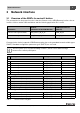

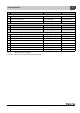

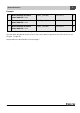
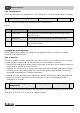

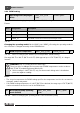
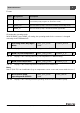
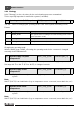
Table Of Contents
- Contents
- 1 Explanation of symbols and safety instructions
- 1.1 Guideline to symbols
- 1.2 Safety instructions
- 2 Product description
- 3 Network interface
- 4 Operating basics
- 5 Incorporation of Logamatic 4000 in LON networks via Logamatic LON-Gateway
- 6 The LON-Gateway as LonMark object
- 7 Error list

Network interface
Technical Information Logamatic LON-Gateway- Subject to modifications resulting from technical improvements!
14
3
3.2 Description of the SNVTs for variant 2 boilers
Note:
The right column indicates the number of bytes.
3.2.1 General
Format: YYYY/MM/DD hh:mm:ss
Note:
230 °F (110 °C) is an invalid value (e.g. no temperature sensor connected, sensor defective, etc.)
For the error list, see Chapter 7, page 43.
Error messages are displayed as 2-byte values (2 x 8 bits). The first byte (the first 8 bits seen from
the left) is the interpretation of the error message of control panel address 2. The second byte (the
remaining 8 bits) is the interpretation of the error message of control panel address 1:
Errors are displayed as binary values and must be converted to decimal values. By comparing with
the error list (see Chapter 7, page 43), the associated texts are assigned to the error numbers.
Example: see page 27
0 Time SNVT_time_ stamp(84) nviUhrzeit 7
Tab. 8 Value for comparison of the time in the Buderus control system with the LON network
1 Outdoor temperature SNVT_temp_p(105) nvoAussen_Tp 2
Tab. 9 Display of the current outdoor temperature
2 Error message 1 control
panel address 1 + 2
SNVT_state(83) nvoFehler1 2
Tab. 10 Output for error messages: error 1 of control panel 1 and 2
First byte - error boiler 2 Second byte - error boiler 1
Display 0000000000000000
Interpretation 2
0
2
1
2
2
2
3
2
4
2
5
2
6
2
7
2
0
2
1
2
2
2
3
2
4
2
5
2
6
2
7
Tab. 11