
Operating Instructions
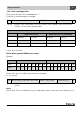
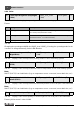

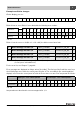
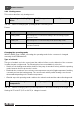
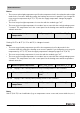
Table Of Contents
- Contents
- 1 Explanation of symbols and safety instructions
- 1.1 Guideline to symbols
- 1.2 Safety instructions
- 2 Product description
- 3 Network interface
- 4 Operating basics
- 5 Incorporation of Logamatic 4000 in LON networks via Logamatic LON-Gateway
- 6 The LON-Gateway as LonMark object
- 7 Error list

Network interface
Technical Information Logamatic LON-Gateway- Subject to modifications resulting from technical improvements!
22
3
3.2.6 Solar
Format:
Changing the operating modeWith the HVAC_heat / HVAC_off setting, the operating mode for the
consumer is changed externally via the LON data bus.
Note:
230 °F (110 °C) is an invalid value (e.g. no temperature sensor connected, sensor defective, etc.).
Note:
230 °F (110 °C) is an invalid value (e.g. no temperature sensor connected, sensor defective, etc.).
Format: yield as numeric value in kWh
53 Solar operating mode (Day/Night/
Auto)
SNVT_hvac_mode
(108)
nviSLTgNtAt 2
Tab. 38 Value for changing the operating mode of the solar heating system
Value Designation Description
0 HVAC_AUTO The solar thermal system works according to the internal setting on
the control panel (automatic mode).
1 HVAC_heat The solar thermal system is turned on and works in manual day mode
(heed instructions - no control function!).
6 HVAC_off The solar thermal system is turned off (see instructions!).
Tab. 39
54 Solar operating mode (Day/
Night/Auto)
SNVT_hvac_mode
(108)
nvoSLBetrieb 2
Tab. 40 Display of the currently-valid operating mode for the solar heating system
55 Collector actual temperature
(FSK)
SNVT_temp_p(105) nvoSLKoll_Tp 2
Tab. 41 Display of the currently-measured collector temperature for the solar heating system
56 Temperature tank 1 bottom
actual (FSS1)
SNVT_temp_p(105) nvoSLSP1Unten_Tp 2
Tab. 42 Display of the currently-measured actual temperature in the solar part of the DHW tank
57 Solar yield (heat quantity) SNVT_elec_kwh_l (146) nvoSLWMZ_Ertrag 4
Tab. 43 Display of the current quantity of heat brought into the solar part of the DHW tank