
Installation Instructions

Prouct Feaurs:
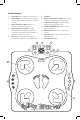
1. Power Dial: turn clockwise to turn unit on
2. Volume Dial: turn clockwise to decrease
volume, and counter-clockwise to increase
volume
3. Bluetooth Connect Button: press to
connect your Bluetooth device
4. Bluetooth Indicator Light: this light
will blink while attempting a Bluetooth
connection. Light will remain on when a
stable connection is present.
5. Aux Jack: an external device may be
plugged in using the included AUX cable
6. Speakers
7. Dance Spot Indication Lights: these lights
indicate on which arrow pad to jump.
8. Light-Up Arrow Pads: the pads display
where to jump by lighting up
9. START/PAUSE Button: press to start or
pause any game
10. Game Modes: selection of 4 dancing
modes
11. Level Selection: select a level in ‘Dance
Game Modes’
12. Soft Dance Surface
1
Level
2
Level
3
Level
4
Level
5
Level
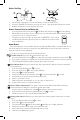
Music Game
(Select Level)
Bluetooth/Aux
Flash
Dance
Memory Game
Dance Game
(Select Level)
with bluetooth wireless technology
STA RT
PAUSE
1
12
2
3
5
7
9
4
8
6
11
10