
Installation Instructions

Befor Yu Play:
How t Conet Dvices via Bluetoh:
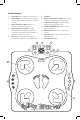
• Press the Bluetooth Connect button
3
. The Bluetooth Indicator Light
4
will start blinking.
• On the Bluetooth interface of your mobile device (or other Bluetooth enabled device), select
“scan for devices” or “search for audio”.
• The pairing code for this light-up dance mat is “KIDZ0515”- select to pair.
• The Bluetooth Indicator Light will steady once a Bluetooth connection has
been established.
Game Mos:
There are many ways to have a blast with this fun Light-Up Dance Mat, so go ahead and choose
the mode that fits your mood! You may press any Game Mode button at any time to start that
mode and exit the current gameplay.
Turn the unit on and select any of the following modes:
Free Dance Mode: Enjoy free dance play without any rules.
1. Press the Flash Dance button
10
once to play this mode with internal music, press Start
9
.
2. Press again to play music via Bluetooth or Aux (see Bluetooth connection instructions above).
3. The arrow pads will light up when jumped upon. Step to the beat!
Dance Game Mode: Play a fun arcade style dance game with 5 diculty levels accompanied
by internal music.
1. Press the Dance Game button
10
to select.
2. Press any level button
11
to select game diculty.
3. Press Start
9
to begin gameplay.
4. Follow the prompts of the indication spots
7
or the arrow pad lights
8
to jump.
5. Avoid waiting too long or hitting the wrong arrow pad.
6. Game is over after 3 “outs”!
7. Game will restart automatically so you can carry on with the fun.
8. It takes 100 seconds to complete each level.
Bluetooth Dance Game Mode: This game is identical to the Dance Game Mode, featuring
Bluetooth-paired or AUX music instead of internal music play.
1. Connect a device via Bluetooth or AUX
5
according to the instructions above.
2. Press the Bluetooth/ Aux Dance Game Mode button
10
to select.
3. Follow instructions 3-8 of regular Dance Game Mode.
Memory Game Mode: Challenge your brain with a fun memory game, reminiscent of “Simon
Says”!
1. Press the Memory Game button
10
to select.
2. Press Start
9
to begin gameplay.
3. The indication lights
7
and the arrow pads
8
will light up to display a pattern.
4. Follow the sequence while trying to avoid any missteps.
5. After each correct response, the game will add one step.
6. How long can YOU keep it up for?
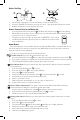
1. Use a Philips screwdriver to loosen the battery cover in the back of unit.
2. Insert 4 x AA/LR6 1.5V batteries, ensuring the + and – signs are properly aligned as shown.
3. Replace the battery cover and tighten the screw.
1
2
KIDZ0515