
Install Instructions


106
107750-01 - 9/17
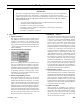
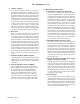
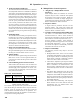
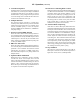
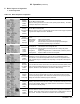
Status Screen Display Description
Priority:
Standby
Status:
Standby
(burner Off, circulator(s) Off)
Boiler is not ring and there is no call for heat, priority equals standby. The boiler
is ready to respond to a call for heat.
Priority:
Central Heat
Status:
Standby
(burner Off, circulator(s) On)
Boiler is not ring. There is a Central Heat call for heat and the Supply temperature
is greater than setpoint minus the “Diff Below”.
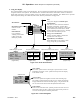
Priority:
Central Heat
Status:
Prepurge
When supply temperature drops burner demand continues with following Status
shown:
Safe Startup: Flame circuit is tested.
Drive purge: The blower is driven to the fan purge speed.
Prepurge: After the blower reaches the fan purge speed setting the
combustion chamber purge is conducted.
Priority:
Central Heat
Status:
Direct
ignition
After purge time is complete the following Status is shown:
Drive light-off: The blower is driven to light-off rate.
Pre-Ignition Test: After the blower reaches light-off rate a safety relay test is
conducted.
Pre-ignition: Spark is energized and it is conrmed that no ame is present
Direct Ignition: Spark and Main fuel valve are energized.
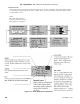
Priority:
Central Heat
Status:
Running
(burner On, circulator(s) On)
After ame is proven the sequence continues with run stabilization and low
re hold time. Once the eld adjustable low re hold time is completed normal
boiler operation begins, modulation rate depending on temperature and setpoint
selections.
Priority:
Domestic
Hot Water
Status:
Running
If the Central Heat call for heat is active and a Domestic Hot Water (DHW) call for
heat received the DHW demand becomes the “priority” and the modulation rate,
setpoint, “Diff Above” and “Diff Below” are based on DHW settings.
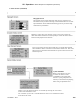
Priority:
Standby
Status:
Post-purge
(burner Off, circulator(s) Off)
If there is no call for heat the main fuel valve is closed and the blower is driven
to the fan post-purge speed. After the blower reaches the fan post-purge speed
setting the combustion chamber purge is conducted.
Priority:
Standby
Status:
Standby
Delay
Standby delay status is entered when a delay is needed before allowing the burner
control to be available. Select “Help” button from the “Home Screen” to determine
the cause of the Standby Delay.
Priority:
Standby
Status:
Lockout
A lockout status is entered to prevent the boiler from running due to a detected
problem. Select “Help” button from the “Home Screen” to determine the cause of
the Lockout. The last 5 Lockouts are recorded in the Lockout History.
XII. Operation (continued)
E. Boiler Sequence of Operation
1. Normal Operation
Table 12.3: Boiler Sequence of Operation