
Setup guide


Chapter 3: 6C110 Setup
3-6 6C110 Overview and Setup Guide
3.6 REMOVING THE POWER BRIDGE ADAPTER
This section provides instructions on removing the power bridge adapter
to allow the 6C110 chassis to support the legacy 6C205-2 or 6C205-3
power supplies. If the 6C210-1 or 6C210-2 power supplies will be used,
DO NOT remove the power bridge adapter.
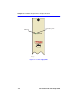
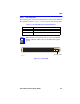
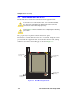
To remove the power bridge adapter, refer to Figure 3-4 and proceed as
follows:
Figure 3-4 Removing the Power Bridge Adapter
1. Attach the ESD wrist strap. Refer to Section 3.5 for details.
2. Locate the power bridge adapter that is attached to the right hand side
of the lower backplane as shown in Figure 3-4.
!
CAUTION
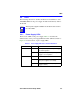
This section applies to users that will equip the 6C110 chassis
with 6C205-2 or 6C205-3 power supplies ONLY. If 6C210-1 or
6C210-2 power supplies will be used, DO NOT remove the
power bridge adapter.
6C405
Upper Backplane
Lower Backplane
Screws (2)
Screws (2)
Power Bridge
Adapter