
Specifications


SSR 8000/8600 Getting Started Guide 93
Chapter 3: Software Installation and Setup
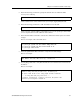
5. Enter the following command to specify the domain name for which the DNS
server(s) have authority:
where <domain-name> is the domain name (for example: yagosysterayon.com).
6. Enter the following command to “add” the DNS server to the SSR:
where <IP-addr> is the IP address of the DNS server. You can specify up to three DNS
servers. Separate the server IP addresses with commas.
7. Enter the save active command to activate the commands and enter yes to activate the
changes.
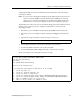
Here is an example of the commands above:
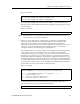
8. Enter the system show dns command to verify the new DNS settings:
Here is an example:
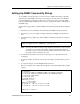
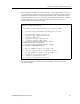
9. Use the ping command to verify that the SSR can resolve the DNS server name into its
IP address:
Here is an example:
system set dns domain
<domain-name>
system set dns server
<IP-addr>[,<IP-addr>[,<IP-addr>]]
ssr# config
ssr(config)# system set dns domain "mktg.mrb.com"
ssr(config)# system set dns server 16.50.11.12
ssr(config)# save active
ssr# system show dns
DNS domain: mrb.com, DNS server(s): 16.50.11.12
ssr# ping ssr
PING ssr.mktg.mrb.com (16.50.11.22): 56 data bytes
64 bytes from 16.50.11.22: icmp_seq=0 ttl=255 time=0 ms
--- ssr.mktg.mrb.com ping statistics ---
1 packets transmitted, 1 packets received, 0% packet loss
round-trip min/avg/max = 0/0/0 ms