
User's Guide
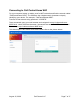
Table Of Contents

Connecting to Call Control Home WiFi
On your computer, laptop, or tablet, scan for WiFi networks and find the network called
“CallControlHome-XXXX”. The XXXX are the 4 alphanumeric characters uniquely
identifying your device. For example, “CallControlHome-889E”.!
Connect to that network using password “12345678”.!
Once connected, open your web browser and navigate it to http://callcontrolhome-
XXXX.local , where XXXX are the same 4 characters that are in the WiFi network name.
For example, http://callcontrolhome-889E.local !
This should open Call Control Home web interface like on the picture below:!
!
August 15, 2020
Call Control LLC
Page of 7 17