
User manual

Chapter 2: Installing your SEC-HD Phason
14
You can connect your SEC-HD to 120 or 230 VAC, 50 or 60 Hz
power.
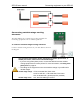
To connect the incoming power source
1. Set the voltage select switch to the correct voltage setting.
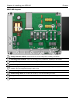
2. Connect the incoming power source as shown in the
following diagram.
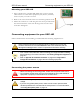
Connecting temperature probes
Replace damaged probes as soon as possible. If there is no probe present or
working properly, the SEC-HD shuts off stages 3, 4, and 5 and operates variable
stages 1 and 2 at idle speed.
When routing the temperature probe cables, do not run them in or along the
same conduit as AC-power lines. For more information, read the Control
Fundamentals guide that came with your control.
You can extend probe cables up to 500 feet. For more information, read the
Control Fundamentals guide that came with your control.
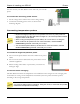
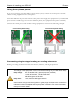
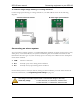
To connect a single temperature probe
Do not run the probe cable in the same conduit as AC power
cables
Do not run the sensor cable beside AC power cables or near
electrical equipment.
When crossing other cables or power lines, cross them at a
90-degree angle.
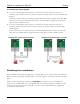
To use four-zone averaging
The SEC-HD can monitor the temperature in four different zones using four-zone averaging. The
control takes an average of the temperatures measured by the four probes and then operates
according to the average temperature.
You must use four probes for averaging. Using two, three, or more than four probes
measures the temperature incorrectly.