
User manual

Chapter 2: Installing your SEC-HD Phason
18
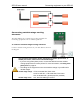
To connect an alarm system
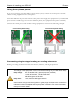
If you are connecting the alarm system to a network of controls and your system uses a
normally open
connection (closes on alarm), connect the system as shown in the normally open
diagram.
Join all the COM connections together and all the N/O connections together. Your SEC-HD
alarm relays must be in parallel with each other so any SEC-HD can trigger the alarm system
when an alarm condition occurs.
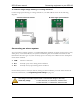
If you are connecting the alarm system to a network of controls and your system uses a
normally closed
connection (opens on alarm), connect the system as shown in the normally
closed diagram.
Join the alarm relays in a continuous loop. Your SEC-HD alarm relays must be in series with
each other so any SEC-HD can trigger the alarm system when an alarm condition occurs.
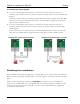
Normally open system (closed on alarm) Normally closed system (open on alarm)
Finishing the installation
After installing and connecting equipment to your SEC-HD, you are ready to finish the installation.
Before you start configuring your SEC-HD, you need to verify the connections and close the SEC-
HD.
Make sure the configuration worksheets in Appendix E correspond to how the equipment is
connected to your SEC-HD. It is very important that the connections and the worksheets are the
same, because the next step after closing the cover is to tell your SEC-HD which equipment is
connected to each terminal.