
Owner's Manual

8 OHMS/CH
4 OHMS/CH
2 OHMS/CH
8
BRIDGED
4
BRIDGED
225W
350W
500W
700W
1000W
120VAC 60Hz
1200VA INTERNAL FUSE
BRIDGE LIMITER
TIP - SIGNAL +
RING - SIGNAL –
SLEEVE - GND
TRS BALANCED
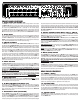
14. LINE OUT AMP 1&2 JACKS (LOW FREQ & HIGH FREQ)
The LINE OUT AMP jacks receive the same signals that drive the internal power amps. These
jacks are TRS (Tip-Ring-Sleeve) for balanced or unbalanced connections. Using a standard instru-
ment cable or TRS (Tip-Ring-Sleeve) cable, the amp signal can be sent to the external power
amp(s). Use the front AMP1 & AMP2 controls for level adjustments. When the X-OVER switch
is set to “IN”, AMP1 receives the low frequency signals and AMP2 receives the high frequency
signals as set by the front panel crossover.
15. SPEAKER OUTPUTS
The KB1000 amp contains four 1/4” jacks (2 per amp), 2 sets of BINDING POSTS (1 per amp),
and two SPEAKON™ speaker output connectors, (1 per amp). The third SPEAKON™ is for
BRIDGE setup only. The AMP 1 (LOW FREQ) outputs correspond to the AMP 1 (LOW FREQ)
knob and the AMP 2 (HIGH FREQ) outputs correspond to the AMP 2 (HIGH FREQ) knob on
the front panel. Multiple speakers can be attached to either the 1/4” or SPEAKON™ jacks so
long as the total impedance is not below 2 ohms per amp.
16. BRIDGE SPEAKER OUTPUTS
The KB1000 produces 1000 watts (bridged mono) into a 4Ω load or 700 watts into an 8Ω load.
To activate, push the rear recessed BRIDGE switch “IN” with a pencil and set the front BI-AMP
switch to the “OUT” position. In BRIDGE mode, the AMP 2R knob is not effective. Plug the
speakers into the BRIDGE ONLY-SPEAKON™ jack or connect across the inner two RED BIND-
ING POSTS. Pins 1+ and 1- are used on the Speakon™ connector. The minimum total imped-
ance is 4 ohms.
17. INTERNAL FUSE
If there are high AC voltage surges or if the amp is used with excessive loads, the internal fuse
will protect your amp from damage. If the fuse fails, use the proper replacement fuse:
120 VAC models use a 25 AMP 250VAC slow blow.
240 VAC models use a 15 AMP 250 VAC slow blow.
18. AC LINE CORD
All KB1000 amplifiers are supplied with detachable three conductor AC line cords. Make sure
the cord is securely inserted into the back of the unit. Never defeat the ground of the AC line
cord as it is there for your protection. If you must plug into a two prong outlet, use a quality
3 to 2 prong grounded adapter and properly ground it.
SPEAKER CONNECTIONS
SPEAKON™ cables are recommended for your system because of their high current capac-
ity. While the standard 16 GA 1/4” cables will work OK with your system, the CARVIN 12
GA SPEAKON™ cables will allow you to gain as much as 20% more power at high power
levels extracting every watt from your KB1000 amp. The very short 1/4” cables will work fine
for the KB1010 and KB1015 combo amps.
FULL RANGE MODE:
The FULL RANGE MODE of your KB1000 amp works well with separate bass and full-range
speaker systems. Instead of using the BI-AMP mode, you can simply run AMP 1 into your
bass speakers and AMP 2 into your full-range speakers using the natural crossover frequencies
of each speaker system. If you need deeper bass or more highs, just turn up amp 1 or amp
2 for a balanced sound. Set the front panel X-OVER switch to the “OUT” position, and the
MONO switch to the “IN” position for FULL-RANGE MODE. If using only ONE speaker, as
with the KB1015 combo, turn the unused POWER AMP control to “0”.
BI-AMP MODE:
To BI-AMP your speakers, connect your BASS speaker(s) into AMP 1 and your FULL-RANGE
speaker(s) into AMP 2. Set the front panel X-OVER switch to the “IN” position for BI-AMPING.
Try setting the X-OVER FREQ control to 800 Hz, this is a common crossover point for many
speaker systems. Now adjust the AMP 1L and AMP 2R power amp controls to get a bal-
HELPFUL HINTS
1) POOR BIAMP SOUND: The speaker cables from AMP 1 (woofers) and AMP 2 (1” tita-
nium hf drivers) have been reversed, AMP 1 and 2 level controls are not balanced or the X-
OVER has been set at an incorrect frequency. (start at 800 Hz). WARNING: Incorrect BIAMP
connections may damage mid/high frequency drivers.
2) NO SOUND FROM AMPS 1 & 2: The rear BRIDGE switch has been inadvertently pushed
in, or speakers plugged into wrong jacks.
3) NO HIGH FREQUENCIES: 1” Titanium HF Drivers have been damaged from to much power
or low frequencies. Be sure to make the correct speaker connections when BIAMPING.
4) WEAK BASS: The speaker systems are wired out of phase to each other. To correct,
reverse the wires on one speaker connector.
5) DIRECT OUT XLR HUM: Try switching the GND LIFT switch IN or OUT. If the hum is not
eliminated, use Carvin’s MTF55 ground lift adaptor which cuts the input ground on the con-
nectors.
6) KEYBOARD PATCHES SOUND “HOLLOW” or HAVE LOW VOLUME:
Try disconnecting one of the stereo inputs from the keyboard. Some keyboard or effects
settings depend on stereo imaging to get their full-sound. This commonly means putting
the left and right signals out-of-phase. If these out-of-phase signals are mixed in either the
MONO or BIAMP MODES, cancellation of signal will occur. Panning or “leslie” effects within
a patch may cause similar results.
7) HEADPHONE VOLUME IS TOO LOW OR YOU NEED TO SHUT OFF SPEAKERS:
Turn down the POWER AMP 1 &2 controls and increase the MAIN level control.
anced sound. If you have the KB1015 combo and you are in the BI-AMP MODE. Be sure
the LOW FREQ INPUT is plugged into AMP 1 and the HI FREQ INPUT is plugged into AMP 2.
STEREO MODE:
The STEREO mode of your KB1000 amp takes advantage of the lush stereo imaging avail-
able from modern keyboards. Simply run AMP 1 into your main speaker and AMP 2 into an
extension speaker. The front panel MONO and X-OVER switches must be left in the “OUT”
position for STEREO MODE.
BRIDGE MODE:
To get high output from your KB1000 amp with two 8 ohm speakers or one 4 ohm speaker,
use the BRIDGE MODE. Set the front panel X-OVER switch to the “OUT” position. On the
rear of the amp, push the BRIDGE switch “IN”. In BRIDGE mode, the AMP 2R control is not
used, use only the AMP 1L control. Plug one SPEAKON™ cable into the rear amp BRIDGE
ONLY connector and daisy-chain another Speakon™ from speaker to speaker. Two 8 ohm
speakers will give you a total impedance of 4 ohms, which is the maximum power from your
amp. If you use two 4 ohms speakers on the BRIDGE output, your amp will shut off and go
into the “protect” mode. To reset, turn your amp off and connect only two 8 ohm speakers
(or one 4 ohm) speaker to your amp when you are in BRIDGE MODE.
FOR MAXIMUM OUTPUT:
To get your loudest output, use multiple speakers or enclosures. Every time you double your
speakers, your acoustic output goes up by a factor of four. Load the amplifier down to its
lowest minimum impedance for maximum RMS power.
EXTENSION SPEAKERS:
The extension speaker for the KB1010 is the 1010E and for the KB1015, the model number
is 1015E. Please contact Carvin sales at 800-854-2235 or carvin.com.
18
13
14
17
12
15
16
15