
Specifications

LCY-07084A-16
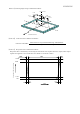
12−3) Precautions in mounting
①Polarizer adhering to the surface of the LCD is made of a soft material and susceptible to flaw,
it must be handled carefully. Protection sheet is applied on the surface to protect. It against
scratches and dirties. It is recommended to remove the protection sheet immediately before the
use, taking care of static electricity.
②Precautions in removing the protection sheet
A) Work environment
When the protection sheet is removed off, static electricity may cause dust to stick to the
polarizer surface. To avoid this, the following working environment is desirable.
a) Floor : Conductive treatment of 1MΩ or more on the tile.
( conductive mat or conductive paint on the tile)
b) Clean room free form dust and with an adhesive mat on the doorway
c) Advisable humidity:50%∼70% Advisable temperature:15℃∼27℃
d) Workers shall wear conductive shoes, conductive work clothes, conductive gloves and an
earth band.
B) Working procedures
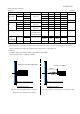
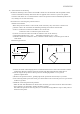
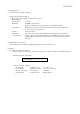
a) Direct the wind of discharging blower somewhat downward to ensure that module is blown
sufficiently. Keep the distance between module and discharging blower within 20 cm.
b) Attach edge of the protection sheet part near discharging blower so as to protect
polarizer against flaw.
c) Remove the protection sheet , pulling edge of the protection sheet slowly to your side.
d) On removing off the protection sheet, pass the module to the next work process to prevent the
module to get dust.
e) Method of removing dust from polarizer
・Blow off dust with N2 blower for which static electricity preventive measure has been taken.
・Since polarizer is vulnerable, wiping should be avoided.
But when the panel has stain or grease, we recommend using adhesive tape to softly remove
them from the panel.
Antistatic Blower
Within 20cm
Module
Wind direction of the blower
edge of the protection sheet