
User's Manual


USING MANUAL
Know Your Product
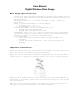
Outdoor Rain Gauge Transmitter
- Measures the rainfall using the internal counting lever and transmits
rainfall & rain mode information to the indoor rain monitor base unit.
-
Lever resolution: each lever swing = 0.02 inch (0.508 millimeter).
- Low battery condition will be detected and displayed on the indoor rain
monitor.
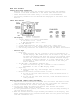
Indoor Rain Monitor
-
LCD display
o 4 digit display for rainfall measurement
IN (inch): 00.00 ~ 99.90
MM (millimeter): 000.0 ~ 999.9
o IN / MM indicator
o 3 rain mode indicators (No rain / Light rain / Heavy rain)
o Antenna wave icon to show synchronization and connection status
o Low battery indicators for outdoor rain gauge and indoor rain monitor
-
Function keys
o Reset key
Press the Reset key for 1 second to clear all information on
the LCD display. The rainfall data can be reset at any time. If
not reset the display will show the total of all rainfall since
the unit was activated or until the maximum allowable display
is reached. To monitor rainfall in a given time period it will
be necessary to reset the unit at the start of the time you
wish to measure.
o IN/ MM (Inch / Millimeter) selection key
Press the selection key for 2 seconds to view a rainfall
measurement in “IN” or “MM” display format.
o Light key
Press the Light key, the backlight will be turned on for 5
seconds.
o Alarm On/Off switch (located on back of unit)
To turn on the rain alert function, slide the Alarm switch to
“On” position.
To turn off the rain alert function, slide the Alarm switch to
“Off” position.
Getting Started (Power reset procedure)
1. Please make sure batteries are inserted into the indoor rain monitor first
and the display appears. The unit will go into “sync mode” for 6 minutes.
2. Insert batteries in the outdoor rain gauge transmitter.
3. In the “sync mode” the indoor rain monitor will receive the outdoor
transmission signal within 6 minutes.
4. At the synchronization period, the antenna wave icon will keep blinking on
the rain monitor display.
5. When the antenna wave icon stops blinking and remains on the display, this
means synchronization has occurred and the main unit has gotten the signal
from the transmitter unit.