
User's Manual


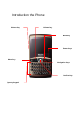
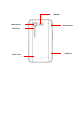

Key function
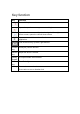
Key Function
Turns off the phone and screen.
Opens the previous screen you were working in.
Opens the Home screen. If you’re viewing the left or right extended
Home screen, opens the central Home screen
Opens a menu with items that affect the current screen or
application.
Four directions key, up down, right and left.
Confirm
key
Send (OK) confirm function
Volume
key
Adjust the device’s volume.
Qwerty
keypad
0-9 input number and character.
Flash
key
Turn Flash light on
Alt key Press to insert number character
Press twice to turn on Number lock