
User's Manual




D2-731G User Manual | 8
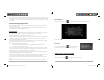
• History : Tap to view the most-recently accessed applications.
• Volume -/+ : Tap to adjust volume.
The notification bar is located at the top of the screen.
The icons on the top right side of status bar display Wi-Fi signal, Wi-Fi connection status, battery
power/battery charging status, and current time. USB and SD card connection status show on the top
left side of the notification bar. Tap the icons to view the date, and time and other information.
1.7 Text Input
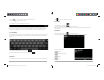
When using the tablet, you may use its virtual keyboard to enter text, numbers and symbols directly by
touching the screen. After tapping into a text input area, the default keyboard will appear as shown
below:
To alternate between numbers and letters, press
To alternate between uppercase and lowercase letter, press
1.8 Reset
Pin and hold the reset button on the side of the device for 10 seconds to restart and reset the system.
D2-731G User Manual | 13
Click to choose an album to edit or delete.
3.3 Video
To access videos, click on gallery .
Choose the folder that contains the video file you want to play.
While the video is playing, you may slightly tap the screen to display the video play settings on the
bottom menu bar.
3.4 Music
From your Application list, click to open the music player.
The song list may be displayed alphabetically by artist name, album name, or song title.
Click on a song to play it.
Playlist
Random Play (Shuffle)
Repeat
Lyrics
D2-731GUserManual.indd Spread 10 of 12 - Pages(10, 15)D2-731GUserManual.indd Spread 10 of 12 - Pages(10, 15) 12/31/2013 10:36:05 AM12/31/2013 10:36:05 AM