
User's Manual





D2-731G User Manual | 16
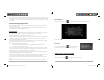
Compose E-mail
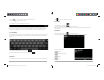
From the inbox, you can click on the top of the screen to compose an E-mail.
Enter the recipient’s E-mail address on the “To” address line, then proceed to fill in the subject and E-
mail content.
Add Attachment
To add attachment(s) while composing an E-mail, click on the three squares icon on the top right corner
of the screen. Select Attach file.
Reply and Forward
To forward or reply to an E-mail, open the message to find a blue menu bar next to the Sender’s name
and E-mail address. Click reply , reply all , or forward to perform those functions.
D2-731G User Manual | 5
To avoid any accidents, please do not use the product when driving or walking on the street.
USB connection is for data transfer only.
**Important Notice: As the product may undergo modifications and improvements, product
specifications and design are subject to change without prior notice.
NOTE: Pictures in this manual are for reference only.
Chapter One: Overview
1.1 Product Overview
1.2 Power On and Off
Power on
Press and hold the power button (see Product Overview image) for 2-3 seconds, and the system will
begin to boot. While the unit is off and charging, press the power button to see charging notification.
D2-731GUserManual.indd Spread 7 of 12 - Pages(18, 7)D2-731GUserManual.indd Spread 7 of 12 - Pages(18, 7) 12/31/2013 10:36:04 AM12/31/2013 10:36:04 AM