
Technical data





5.1.2. Brief description of operation
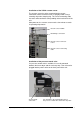
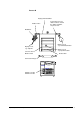
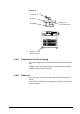
The LSC control system is operated via the central turn & push
button
and four function keys at both sides of the control panel
. The turn & push button is the main element for
operating the control system. Turning the turn & push button
positions the focus on the desired function in the menu or in the
window. Pressing the turn & push button
activates the selected
function. Parameters (set values, etc.) are entered in the same
way.
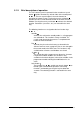
The following functions are assigned to the four function keys
:
Standby
Switches the unit into the standby mode, i.e. all aggregates
are switched off. This function is always available. It is
usually used after the drying process is completed and
before the manual aeration.
Run
Activates the phase that has been pre-selected in the
“Manual” menu or starts a program. Phases are changed in
the manual mode in the RUN state. This function is only
available when all menus and windows are closed.
°C
mbar
The conversion table “vapor pressure above ice“ for water
is opened in another window. This function is only
available in the mimic diagram, in the values window, in the
programmer module or during the modification of a set
value.
Lock/Unlock
The function keys
and the turn & push button are
locked against unintentional operation. The locking
function is activated by pressing the key for about two
seconds. The unlocking function is activated in the same
way.
40 • LSC Control System Operating Manual Freeze Dryer ALPHA 1-4 LSC / ALPHA 2-4 LSC