
Technical data

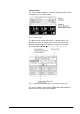


switch manually to the next phase without setting the unit to the
standby mode. When all desired phases are finished – usually
after the final drying phase – the process is finished by pressing
the function key “Standby”
. In the manual mode, the duration of
the different phases is determined by the operator. It is not timer-
controlled.
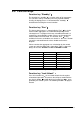
The following phases can be selected in the manual mode:
• Freezing (Only available with process A!)
• Freezing + Warm-Up VP (process A)
Cooling IC + Warm-Up VP (process B)
• Main-drying
• Final-drying
The phase “Warm-Up VP” activates the vacuum pump with closed
pressure control valve. This phase should last for at least 20
minutes to increase the service life of the pump.
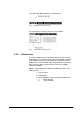
Fig. 20 Pop-up menu for manual control
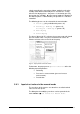
Furthermore, the pop-up menu Special functions offers the
following manual operations:
• Defrosting
• Pressure inc. measurement (pressure increase
measurement).
• Preselection
5.4.1. Input of set values in the manual mode
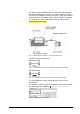
The set values of the process are stored in a so-called nominal
value set for each phase.
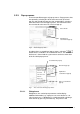
The dialog box for modifying set values can be opened via the
menu VALUES Æ Set Values for Manual Mode.
50 • LSC Control System Operating Manual Freeze Dryer ALPHA 1-4 LSC / ALPHA 2-4 LSC