
Technical data




Code 29
See chapter 5.6.1.
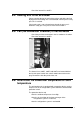
Code 30
Note: Error in configuration memory. Please
verify user defined parameters and check the
back-up battery.
This error message is displayed when the system is switched on
and the buffer battery power for the settings and the real-time
clock is too low. Please replace the buffer battery. Then it is
necessary to reset the clock (see chapter 5.7.4). The settings
(setpoints, etc.) - except for the modifications made in the last
operating phase - are automatically reloaded from the second
read-only memory so that they are available even after a failure of
the buffer battery. Nevertheless, it is recommended to check the
settings.
Code 31
Note: Error in configuration memory. Factory
settings were loaded! Please check the back-up
battery.
Please contact our service department!
Code 32
Overpressure refrigerator RM1.
Overpressure in the refrigeration unit RM1, released via the
pressure switch. Please check the ambient temperature, the air
circulation of the heat exchanger of the refrigeration unit and the
load of the unit.
Code 33
Overpressure refrigerator RM2.
Overpressure in the refrigeration unit RM2, released via the
pressure switch. Please check the ambient temperature, the air
circulation of the heat exchanger of the refrigeration unit and the
load of the unit.
Code 34
Overpressure refrigerator RM3.
Overpressure in the refrigeration unit RM3, released via the
pressure switch. Please check the ambient temperature, the air
circulation of the heat exchanger of the refrigeration unit and the
load of the unit.
78 • Troubleshooting Operating Manual Freeze Dryer ALPHA 1-4 LSC / ALPHA 2-4 LSC