
User's Manual







98
Enter Setup
1600 Series Barcode Scanner User Guide
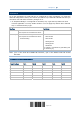
Codabar F N X N F
Code 93 I L L L G
Code 128 H K K K C
UPC-E S E C E E
EAN-8 P B B FF E
EAN-13 M A A F E
UPC-A J A A A E
MSI V V D P M
Plessey W W E Q P
Telepen Z --- --- --- ---
5.4.2 CHANGE CODE ID
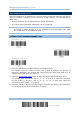
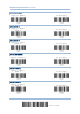
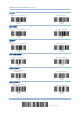
1) Read the label of a specific symbology below to change its code ID.
2) Read the “Hexadecimal Value
” label on page 124 for the desired character string. For
example, read “4” and “4” for applying the character [D] for Code ID.
3) Read the “Validate” label on the same page to complete this setting.
Apply Code ID Set 1
Apply Code ID Set 2
Apply Code ID Set 3
Apply Code ID Set 4
Apply Code ID Set 5