
User's Manual


19
Installing 5000/5100:
Setting up the terminal
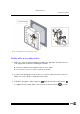
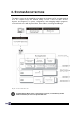
Figure 15: Mounting to wall
Mounting to the Wall
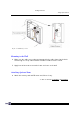
4. Make sure the cables are routing and arranged in the cable channel at the back.
Such design is to keep cables invisible and inaccessible from the outside.
5. Apply four 4x16 screws to mount the lower enclosure on the wall.
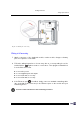
Attaching Optional Items
6. Attach the memory card and Ethernet card, if there is any.
>> Also see Sections 1.3 Features
& 1.5 Options