ap2600getstart.
ap2600getstart.fm Page 2 Tuesday, April 17, 2012 10:39 AM 1 About this Guide This Guide provides instructions on how to install and configure your Cisco Aironet 2600 Series Access Point. This guide also provides mounting instructions and limited troubleshooting procedures. The 2600 Series Access Point is referred to as the 2600 series or the access point in this document.
ap2600getstart.fm Page 3 Tuesday, April 17, 2012 10:39 AM – Radio Resource Management (RRM) – Rogue detection – Management Frame Protection (MFP) – Throughput, forwarding, and filtering performance scaled to meet 3 spatial stream 450 Mbps data-rates • 32 MB flash size • 802.11af/at – CDP (Cisco Discovery Protocol) • 2.4 GHz and 5 GHz 802.
ap2600getstart.fm Page 4 Tuesday, April 17, 2012 10:39 AM Warning Read the installation instructions before you connect the system to its power source. Statement 1004 Warning Installation of the equipment must comply with local and national electrical codes. Statement 1074 Warning This product relies on the building’s installation for short-circuit (overcurrent) protection. Ensure that the protective device is rated not greater than: 20A.
ap2600getstart.fm Page 5 Tuesday, April 17, 2012 10:39 AM Note The access point is suitable for use in environmental air space in accordance with section 300.22.C of the National Electrical Code and sections 2-128, 12-010(3), and 12-100 of the Canadian Electrical Code, Part 1, C22.1. You should not install the power supply or power injector in air handling spaces. Note Use only with listed ITE equipment.
ap2600getstart.fm Page 6 Tuesday, April 17, 2012 10:39 AM • AIR-CAP2602I-x-K9 and AIR-SAP2602I-x-K9—two 2.4-GHz/5-GHz dual-band radios, with integrated dual-band inverted-F antennas For information on the regulatory domains (shown as “x” in the model numbers) see “Regulatory Domains” section on page 7. External Antennas The 2601E and 2602E models are configured with up to four external dual-band dipole antennas, and two 2.4-GHz single-band radios in 2601 models or two 2.
ap2600getstart.fm Page 7 Tuesday, April 17, 2012 10:39 AM • Antenna unit integrated into the 2601I and 2602I model access points. • Peak gain is approximately 2 dBi in the 2.4-GHz band and approximately 4 dBi in the 5-GHz band. Regulatory Domains The 2600 series supports the following regulatory domains (shown as “x” in the model numbers): • -A, -C, -E, -I, -K, -N, -Q, -R, -S, -T Countries Supported Click this URL to browse to a list of countries and regulatory domains supported by the 2600: www.cisco.
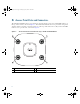
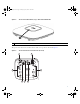
ap2600getstart.fm Page 8 Tuesday, April 17, 2012 10:39 AM 6 Access Point Ports and Connectors The 2601E and 2602E model access points have external antenna connectors and the LED indictor on the top of the model, as shown in Figure 1. The 2601I and 2602I model access points have integrated antennas and does not have external connectors on the top of the unit; however, they do have the LED indicator on top of the unit, as shown in Figure 2.
ap2600getstart.fm Page 9 Tuesday, April 17, 2012 10:39 AM Figure 2 Access Point LED Indicator (top)—2601I and 2602I Models 1 1 LED indicator The ports and connections on the bottom of the access point are shown in Figure 3.
ap2600getstart.fm Page 10 Tuesday, April 17, 2012 10:39 AM 1 Kensington lock slot 4 Console port 5 Security padlock and hasp (padlock not included) DC Power connection 2 3 Gbit Ethernet port 6 Mounting bracket pins (feet for desk or table-top mount) 7 Configuring the Access Point This section describes how to connect the access point to a wireless LAN controller.
ap2600getstart.fm Page 11 Tuesday, April 17, 2012 10:39 AM Note You cannot edit or query any access point using the controller CLI if the name of the access point contains a space. Note Make sure that the controller is set to the current time. If the controller is set to a time that has already occurred, the access point might not join the controller because its certificate may not be valid for that time.
ap2600getstart.fm Page 12 Tuesday, April 17, 2012 10:39 AM Preparing the Access Point Before you mount and deploy your access point, we recommend that you perform a site survey (or use the site planning tool) to determine the best location to install your access point. You should have the following information about your wireless network available: • Access point locations. • Access point mounting options: below a suspended ceiling, on a flat horizontal surface, or on a desktop.
ap2600getstart.fm Page 13 Tuesday, April 17, 2012 10:39 AM Performing a Pre-Installation Configuration The following procedures ensure that your access point installation and initial operation go as expected. A pre-installation configuration is also known as priming the access point. This procedure is optional. Note Performing a pre-installation configuration is an optional procedure.
ap2600getstart.fm Page 14 Tuesday, April 17, 2012 10:39 AM Step 1 Make sure that the Cisco wireless LAN controller DS port is connected to the network. Use the CLI, web-browser interface, or Cisco WCS procedures as described in the appropriate Cisco wireless LAN controller guide. a. Make sure that access points have Layer 3 connectivity to the Cisco wireless LAN controller Management and AP-Manager Interface. b. Configure the switch to which your access point is to attach.
ap2600getstart.fm Page 15 Tuesday, April 17, 2012 10:39 AM Note The 2600 series access point requires a Gigibit Ethernet link to prevent the Ethernet port from becoming a bottleneck for traffic because wireless traffic speeds exceed transmit speeds of a 10/100 Ethernet port. b. As the access point attempts to connect to the controller, the LEDs cycle through a green, red, and amber sequence, which can take up to 5 minutes.
ap2600getstart.fm Page 16 Tuesday, April 17, 2012 10:39 AM 8 Mounting the Access Point Cisco Aironet 2600 series access points can be mounted in several configurations, including on a suspended ceiling, on a hard ceiling or wall, on an electrical or network box, and above a suspended ceiling. Click this URL to browse to complete access point mounting instructions: http://www.cisco.com/en/US/docs/wireless/access_point/mounting/guide/apmount.
ap2600getstart.fm Page 17 Tuesday, April 17, 2012 10:39 AM 10 Troubleshooting If you experience difficulty getting your access point installed and running, look for a solution to your problem in this guide or in additional access point documentation. These, and other documents, are available on Cisco.com.
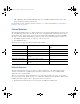
ap2600getstart.fm Page 18 Tuesday, April 17, 2012 10:39 AM Figure 5 Access Point LED Location 272378 1 1 Status LED The access point status LED indicates various conditions and are described in Table 1.
ap2600getstart.
ap2600getstart.fm Page 20 Tuesday, April 17, 2012 10:39 AM Controller software enables you to configure the access points to send all CAPWAP-related errors to a syslog server. You do not need to enable any debug commands on the controller because all of the CAPWAP error messages can be viewed from the syslog server itself. The state of the access point is not maintained on the controller until it receives a CAPWAP join request from the access point.
ap2600getstart.fm Page 21 Tuesday, April 17, 2012 10:39 AM • The access point is still connected to the same controller, and a specific syslog server IP address has been configured for the access point on the controller using the config ap syslog host specific Cisco_AP syslog_server_IP_address command. In this case, the controller sends the new specific syslog server IP address to the access point. • The access point is disconnected from the controller and joins another controller.
ap2600getstart.fm Page 22 Tuesday, April 17, 2012 10:39 AM Models Certification Numbers AIR-CAP2602E-A-K9 AIR-CAP2602I-A-K9 AIR-SAP2602E-A-K9 AIR-SAP2602I-A-K9 LDK102080 AIR-CAP2601E-A-K9 AIR-CAP2601I-A-K9 AIR-SAP2601E-A-K9 AIR-SAP2601I-A-K9 LDK102081 Manufacturer: Cisco Systems, Inc. 170 West Tasman Drive San Jose, CA 95134-1706 USA This device complies with Part 15 rules. Operation is subject to the following two conditions: 1. This device may not cause harmful interference, and 2.
ap2600getstart.fm Page 23 Tuesday, April 17, 2012 10:39 AM Caution The Part 15 radio device operates on a non-interference basis with other devices operating at this frequency when using the integrated antennas. Any changes or modification to the product not expressly approved by Cisco could void the user’s authority to operate this device. Caution Within the 5.15 to 5.25 GHz and 5.47-5.
ap2600getstart.fm Page 24 Tuesday, April 17, 2012 10:39 AM Guidelines for Operating Cisco Aironet Access Points in Japan This section provides guidelines for avoiding interference when operating Cisco Aironet access points in Japan. These guidelines are provided in both Japanese and English.
ap2600getstart.fm Page 25 Tuesday, April 17, 2012 10:39 AM Statement 371—Power Cable and AC Adapter English Translation When installing the product, please use the provided or designated connection cables/power cables/AC adaptors. Using any other cables/adaptors could cause a malfunction or a fire. Electrical Appliance and Material Safety Law prohibits the use of UL-certified cables (that have the “UL” shown on the code) for any other electrical devices than products designated by CISCO.
ap2600getstart.fm Page 26 Tuesday, April 17, 2012 10:39 AM Cet appareil numerique de la classe B respecte les exigences du Reglement sur le material broilleur du Canada. This device complies with Class B Limits of Industry Canada. Operation is subject to the following two conditions: 1. This device may not cause harmful interference, and 2. This device must accept any interference received, including interference that may cause undesired operation.
ap2600getstart.
ap2600getstart.fm Page 28 Tuesday, April 17, 2012 10:39 AM The following standards were applied: EMC—EN 301.489-1 v1.8.1; EN 301.489-17 v2.1.1 Health & Safety—EN60950-1: 2005; EN 50385: 2002 Radio—EN 300 328 v 1.7.1; EN 301.893 v 1.5.1 The conformity assessment procedure referred to in Article 10.4 and Annex III of Directive 1999/5/EC has been followed.
ap2600getstart.fm Page 29 Tuesday, April 17, 2012 10:39 AM This device also conforms to the EMC requirements of the Medical Devices Directive 93/42/EEC. Note This equipment is intended to be used in all EU and EFTA countries. Outdoor use may be restricted to certain frequencies and/or may require a license for operation. For more details, contact Cisco Corporate Compliance.
ap2600getstart.fm Page 30 Tuesday, April 17, 2012 10:39 AM As such the systems are designed to be operated as to avoid contact with the antennas by the end user. It is recommended to set the system in a location where the antennas can remain at least a minimum distance as specified from the user in accordance to the regulatory guidelines which are designed to reduce the overall exposure of the user or operator. Separation Distance MPE 0.63 mW/cm 2 Distance Limit 20 cm (7.87 inches) 1.
ap2600getstart.fm Page 31 Tuesday, April 17, 2012 10:39 AM This Device Meets the Industry Canada Guidelines for Exposure to Radio Waves The 2600 series device includes a radio transmitter and receiver. It is designed not to exceed the limits for exposure to radio waves (radio frequency electromagnetic fields) as referenced in Health Canada Safety Code 6. The guidelines include a substantial safety margin designed into the limit to ensure the safety of all persons, regardless of age and health.
ap2600getstart.fm Page 32 Tuesday, April 17, 2012 10:39 AM • United Kingdom, National Radiological Protection Board at this URL: www.nrpb.org.uk • Cellular Telecommunications Association at this URL: www.wow-com.com • The Mobile Manufacturers Forum at this URL: www.mmfai.org Administrative Rules for Cisco Aironet Access Points in Taiwan This section provides administrative rules for operating Cisco Aironet access points in Taiwan. The rules for all access points are provided in both Chinese and English.
ap2600getstart.fm Page 33 Tuesday, April 17, 2012 10:39 AM English Translation Administrative Rules for Low-power Radio-Frequency Devices Article 12 For those low-power radio-frequency devices that have already received a type-approval, companies, business units or users should not change its frequencies, increase its power or change its original features and functions.
ap2600getstart.fm Page 34 Tuesday, April 17, 2012 10:39 AM English Translation Low-power Radio-frequency Devices Technical Specifications 4.7 Unlicensed National Information Infrastructure 4.7.5 Within the 5.25-5.35 GHz band, U-NII devices will be restricted to indoor operations to reduce any potential for harmful interference to co-channel MSS operations. 4.7.6 The U-NII devices shall accept any interference from legal communications and shall not interfere the legal communications.
ap2600getstart.fm Page 35 Tuesday, April 17, 2012 10:39 AM English Translation This equipment operates on a secondary basis and consequently must accept harmful interference, including interference from stations of the same kind. This equipment may not cause harmful interference to systems operating on a primary basis. Declaration of Conformity Statements All the Declaration of Conformity statements related to this product can be found at the following location: http://www.ciscofax.
ap2600getstart.fm Page 36 Tuesday, April 17, 2012 10:39 AM Step 1 Enter configuration mode at the Cisco IOS CLI. Step 2 Create the DHCP pool, including the necessary parameters such as default router and name server.
ap2600getstart.fm Page 37 Tuesday, April 17, 2012 10:39 AM 13 Access Point Specifications Table 2 lists the technical specifications for 2600 series access points. Table 2 Access Point Specifications Category Specification Dimensions (LxWxD) 8.68 x 8.68 x 1.84 in. (22.04 x 22.04 x 4.67 cm) Weight 1.9 lbs (0.
ap2600getstart.fm Page 38 Tuesday, April 17, 2012 10:39 AM 14 Obtaining Documentation and Submitting a Service Request For information on obtaining documentation, submitting a service request, and gathering additional information, see the monthly What’s New in Cisco Product Documentation, which also lists all new and revised Cisco technical documentation, at: http://www.cisco.com/en/US/docs/general/whatsnew/whatsnew.