
Installation Instructions


Data Sheet
© 2011 Cisco and/or its affiliates. All rights reserved. This document is Cisco Public Information. Page 2 of 4
e) Additional mitigation techniques can include first, not orienting the antennas in the main beam of the weather
radar, and second, ensuring that the antenna is not positioned in line-of-sight of the FAA TDWR.
f) Verify that the antennas used are approved for use with Cisco WLAN systems. Installers or operators using
nonapproved antennas or making any unauthorized changes may be subject to enforcement action.
WISPA Database
In conjunction with industry, the Wireless Internet Service Providers Association (WISPA) has created a database for
installers and operators for registration of these outdoor systems including Mesh installations. This database,
accessible from the WISPA website http://www.spectrumbridge.com/udrs/home.aspx, should be used by the installer
or operator to determine if they are within 35 km of the TDWR, as well as to register the system if operating within this
range of the TDWR.
This will help the FCC and FAA address interference issues in the future. Cisco strongly urges our customers to
register their outdoor systems in this database:
Instructions for WISPA Database Registration
1. Connect to the database at: http://www.spectrumbridge.com/udrs/home.aspx. This will take you to the main
page.
2. On the main page, select Search at the upper-left. This will take you to the TDWR radar page. Enter the
requested information to find the proximity of specific WLAN systems to TDWR systems.
3. If you need to register one or more WLANs, you will need an account. Click the User Signup button on the page
and create a registration for your company. There is no charge for registration.
4. Once you are registered user or if already registered log in using your username and password.
5. Select “device management” - to start process to register your device.
6. Enter all information and follow procedure as instructed to complete registration. Once you complete your
registration for that device, you can repeat the process for other devices needing to be registered.
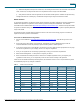
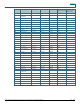
Table 1 shows the TDWR information provided by NTIA, this information is here to use as a quick reference, please
see WISPA web page for any changes or additions.
Table 1. TDWR Location Information
STATE
CITY
LONGITUDE
LATITUDE
FREQUENCY
TERRAIN
ELEVATION (MSL)
[ft]
ANTENNA
HEIGHT ABOVE
TERRAIN [ft]
AZ
PHOENIX
W 112 09 46
N 33 25 14
5610 MHz
1024
64
CO
DENVER
W 104 31 35
N 39 43 39
5615 MHz
5643
64
FL
FT LAUDERDALE
W 080 20 39
N 26 08 36
5645 MHz
7
113
FL
MIAMI
W 080 29 28
N 25 45 27
5605 MHz
10
113
FL
ORLANDO
W 081 19 33
N 28 20 37
5640 MHz
72
97
FL
TAMPA
W 082 31 04
N 27 51 35
5620 MHz
14
80
FL
WEST PALM BEACH
W 080 16 23
N 26 41 17
5615 MHz
20
113
GA
ATLANTA
W 084 15 44
N 33 38 48
5615 MHz
962
113
IL
MCCOOK
W 087 51 31
N 41 47 50
5615 MHz
646
97
IL
CRESTWOOD
W 087 43 47
N 41 39 05
5645 MHz
663
113
IN
INDIANAPOLIS
W 086 26 08
N 39 38 14
5605 MHz
751
97