
User's Guide



Table Of Contents
- Introduction
- Package Inventory
- Ripwave Models
- Minimum Computing Requirements
- Physical Characteristics
- Installing an Ethernet Modem
- Installing a USB Modem
- Accessing the Internet
- Troubleshooting
- Installing Ripwave Monitor
- TroubleshootingUsing Ripwave Monitor
- Uninstalling Ripwave Monitor
- Installing Navini Diagnostics (NavDiag)
- TroubleshootingUsing Navini Diagnostics (NavDiag)
- Uninstalling Navini Diagnostics
- Installing & Charging the Battery
- Care & Maintenance
- Upgrading the Modem
- ADDENDUM 1: Ripwave™ Modem - PC Troubleshooting
- ADDENDUM 2: End User Software License Agreement
Navini Networks, Inc. Ripwave Modem User Guide
#40-00097-00 Rev F v1.0 11
May 21, 2004
hysical
istics,
P
Character
Continued
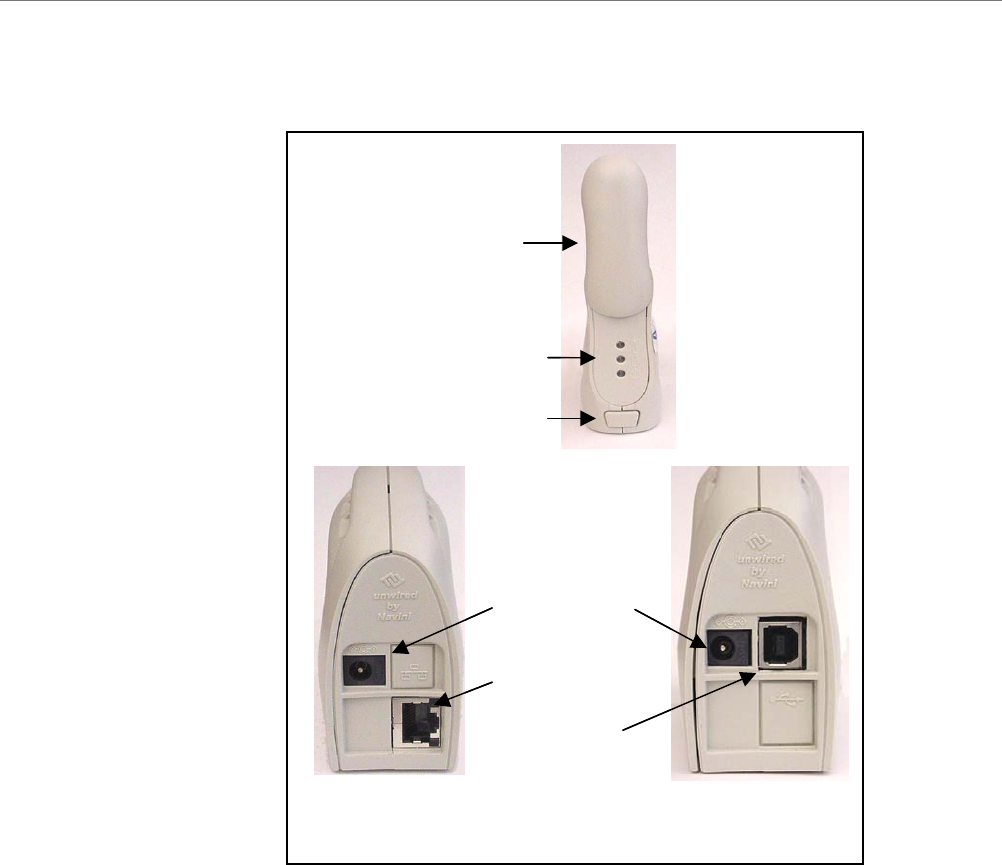
2.3, 2.5, 2.6, & 3.5 GHz LED Ripwave Modems
Antenn
a
Indicator Lights
On/Off Switch
Power Adapter
Connectio
n
Ethernet Cable
Connectio
n
USB Cable
Connection
Back of 2.3,
2.5, 2.6 & 3.5 E
Back of 2.3,
2.5, 2.6 & 3.5
U
Part