
User's Guide


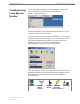


Table Of Contents
- Introduction
- Package Inventory
- Ripwave Models
- Minimum Computing Requirements
- Physical Characteristics
- Installing an Ethernet Modem
- Installing a USB Modem
- Accessing the Internet
- Troubleshooting
- Installing Ripwave Monitor
- TroubleshootingUsing Ripwave Monitor
- Uninstalling Ripwave Monitor
- Installing Navini Diagnostics (NavDiag)
- TroubleshootingUsing Navini Diagnostics (NavDiag)
- Uninstalling Navini Diagnostics
- Installing & Charging the Battery
- Care & Maintenance
- Upgrading the Modem
- ADDENDUM 1: Ripwave™ Modem - PC Troubleshooting
- ADDENDUM 2: End User Software License Agreement

Ripwave Modem User Guide Navini Networks, Inc.
Troubleshooting Using
Ripwave Monitor,
continued
The Signal Strength and Signal Quality are dynamic bar graphs
that indicate how well your Modem is receiving signals from the
Base Station. To increase the strength and quality of the signal,
change the location of the Ripwave Modem. Try moving it closer
to a window, to a higher location, away from other wireless devices
(microwave ovens, cordless phones), and away from metal objects
is repositioned,
bserve the Signal Strength and Signal Quality bar graphs. Position
e Modem for maximum signal strength and quality.
you make a service call to your Service Provider, the Technician
ay ask you to read the numbers to the right of the signal bar
raphs. These will help the Technician to evaluate the best position
r your Ripwave Modem. The Battery Strength bar graph and the
umber to the right of it indicate how much charge is left in the
attery. Not all Modems have the battery option. Only some LED
odems have a battery option. Without a battery in the Modem,
dem is
ot o ional; the wireless signal between Modem and Base
Station is down; and there is no battery being used.
(shelves, file cabinets). As the Ripwave Modem
o
th
If
m
g
fo
n
b
M
the Battery Strength bar graph and number will be disabled (grayed
out).
If the connection between the PC and the Modem or between the
Modem and the Base Station is interrupted, a, red circle with a
slash will be positioned over the corresponding icon.
In this example, the cable connecting the computer and Mo
n perat
26 Part #40-00097-00 Rev F v1.0
May 21, 2004