
User's Guide




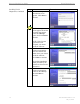
Table Of Contents
- Introduction
- Package Inventory
- Ripwave Models
- Minimum Computing Requirements
- Physical Characteristics
- Installing an Ethernet Modem
- Installing a USB Modem
- Accessing the Internet
- Troubleshooting
- Installing Ripwave Monitor
- TroubleshootingUsing Ripwave Monitor
- Uninstalling Ripwave Monitor
- Installing Navini Diagnostics (NavDiag)
- TroubleshootingUsing Navini Diagnostics (NavDiag)
- Uninstalling Navini Diagnostics
- Installing & Charging the Battery
- Care & Maintenance
- Upgrading the Modem
- ADDENDUM 1: Ripwave™ Modem - PC Troubleshooting
- ADDENDUM 2: End User Software License Agreement

Ripwave Modem User Guide Navini Networks, Inc.
28 Part #40-00097-00 Rev F v1.0
May 21, 2004
for some reason you need to uninstall the Ripwave Monitor
ftware, e.g., to upgrade your Operating System software, follow
Uninstalling
Ripwave
Monitor
If
so
the procedure below.
Step Action Illustration
1. On your computer
screen lower left corner,
click on Start >
Programs > Navini
Navini Monitor >
Uninstall Navini
Monitor. The Install-
Anywhere Uninstaller
screen appears. Click
Uninstall.
2. The screen will cycle
through as the
application files are
uninstalled.
3. The Uninstall Complete
screen appears when
finished. Click on Quit
to close the Uninstall
screen.
4. Restart the PC to
complete the uninstall
process. This will ensure
it functions properly
after uninstalling.