
User's Guide




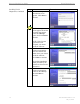
Table Of Contents
- Introduction
- Package Inventory
- Ripwave Models
- Minimum Computing Requirements
- Physical Characteristics
- Installing an Ethernet Modem
- Installing a USB Modem
- Accessing the Internet
- Troubleshooting
- Installing Ripwave Monitor
- TroubleshootingUsing Ripwave Monitor
- Uninstalling Ripwave Monitor
- Installing Navini Diagnostics (NavDiag)
- TroubleshootingUsing Navini Diagnostics (NavDiag)
- Uninstalling Navini Diagnostics
- Installing & Charging the Battery
- Care & Maintenance
- Upgrading the Modem
- ADDENDUM 1: Ripwave™ Modem - PC Troubleshooting
- ADDENDUM 2: End User Software License Agreement

Navini Networks, Inc. Ripwave Modem User Guide
Installing Navini
iagnostics
NavDiag)
our a software release prior to 4.0, you
have the Navini Monitor software and not the Navini Diagnostics.
D
(
If y Ripwave Modem has
Step Action Illustration
1. Shut down all programs,
including anti-virus
software programs,
before installing the
Navini Diagnostics
software.
2. Insert the Navini
Diagnositcs Installation
CD into the CD-ROM
drive.
3. d
. In
the Run window, enter
e:\setup in the Open
field (where “e”
represents the CD drive
wher you inserted the
At the bottom left-han
corner of your screen,
click Start > Run
installation CD). Click
OK to continue.
4.
re has
The InstallAnywhere
window appears. The
progress bar indicates
that InstallAnywhe
initialized.
5. The Navini Diagnostics
Language screen
appears. Select a
language and click OK
to continue.
Part #40-00097-00 Rev F v1.0 29
May 21, 2004