
User's Guide


Table Of Contents
- Introduction
- Package Inventory
- Ripwave Models
- Minimum Computing Requirements
- Physical Characteristics
- Installing an Ethernet Modem
- Installing a USB Modem
- Accessing the Internet
- Troubleshooting
- Installing Ripwave Monitor
- TroubleshootingUsing Ripwave Monitor
- Uninstalling Ripwave Monitor
- Installing Navini Diagnostics (NavDiag)
- TroubleshootingUsing Navini Diagnostics (NavDiag)
- Uninstalling Navini Diagnostics
- Installing & Charging the Battery
- Care & Maintenance
- Upgrading the Modem
- ADDENDUM 1: Ripwave™ Modem - PC Troubleshooting
- ADDENDUM 2: End User Software License Agreement
Navini Networks, Inc. Ripwave Modem User Guide
Troubleshooting Using
avini Diagnostics,
ontinued
he History graphs plot the signal every 10 seconds. Read the
graphs from right to left.
If the connection between the PC and the Modem or between the
Modem and the Base Station is interrupted, a red circle with a slash
question mark is positioned over the corresponding icon.
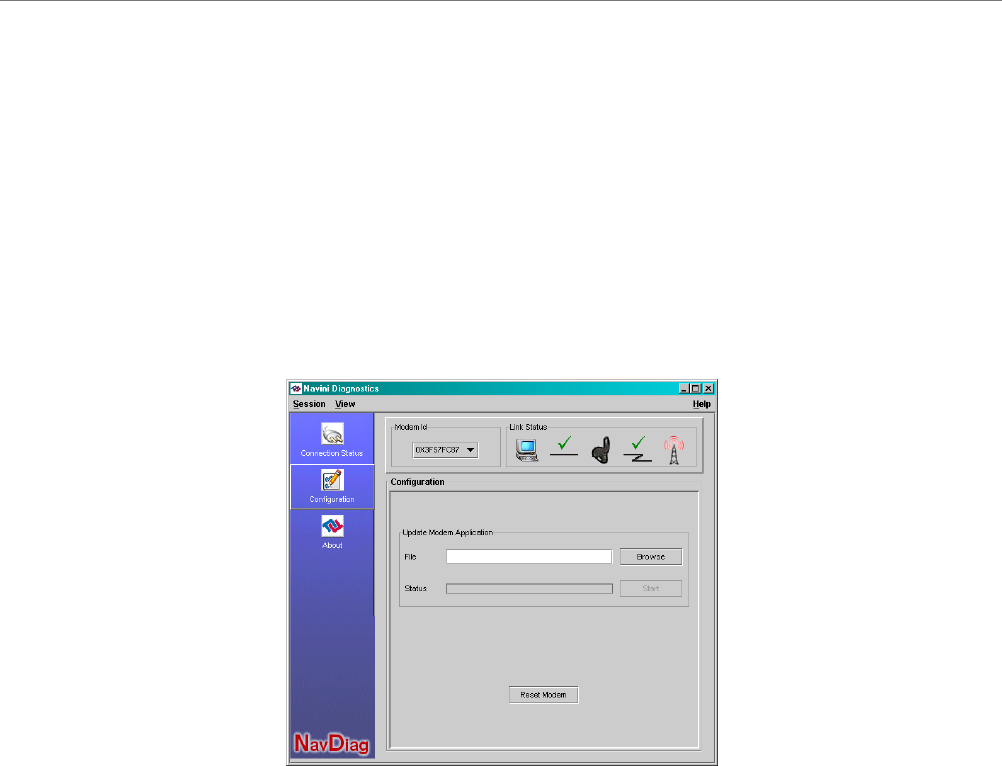
On the left-hand side of the screen, there are three screen options:
Connection Status, Configuration, and About. The following
screen will appear when you press the Configuration button.
N
c
T
The Configuration screen enables you to update your Modem’s
software if you are so directed by your Service Provider. If you
must update your Modem’s software, your Service Provider will
provide you with instructions regarding what to do.
If you click on About, the following screen will appear.
Part #40-00097-00 Rev F v1.0 33
May 21, 2004