
User's Guide


Table Of Contents
- Introduction
- Package Inventory
- Ripwave Models
- Minimum Computing Requirements
- Physical Characteristics
- Installing an Ethernet Modem
- Installing a USB Modem
- Accessing the Internet
- Troubleshooting
- Installing Ripwave Monitor
- TroubleshootingUsing Ripwave Monitor
- Uninstalling Ripwave Monitor
- Installing Navini Diagnostics (NavDiag)
- TroubleshootingUsing Navini Diagnostics (NavDiag)
- Uninstalling Navini Diagnostics
- Installing & Charging the Battery
- Care & Maintenance
- Upgrading the Modem
- ADDENDUM 1: Ripwave™ Modem - PC Troubleshooting
- ADDENDUM 2: End User Software License Agreement
Ripwave Modem User Guide Navini Networks, Inc.
Installing &
harging the
attery
.4 GHz Battery
The battery pack was an option on former models of Ripwave
Modem hased optionally.
If you have a battery, the battery pack is installed in the bottom of
Rip y compartment of the 2.4 GHz
Ripwa the 2.3, 2.5, 2.6, and 3.5 GHz
models. To install and charge or remove the battery pack, follow
the ste l.
C
B
2
s. Batteries could be purc
the wave Modem. The batter
ve Modem varies from
ps based on your mode
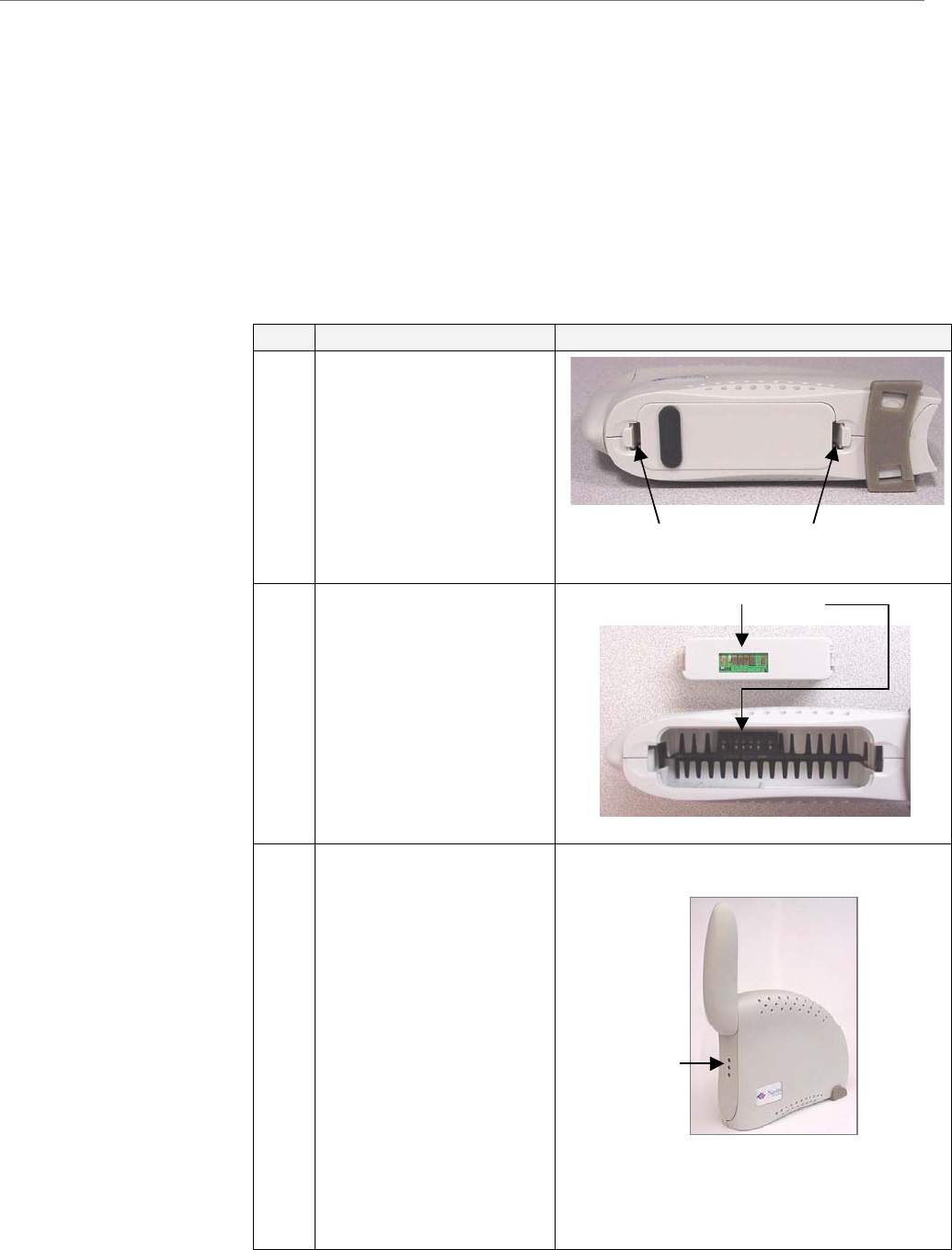
Step Action Illustration
1.
Squeeze both tabs to
remove or install the
battery pack cover.
Note that the cover is
not used when the
battery pack is installed
in the Modem.
2.
Install the battery pack
into the Ripwave
Modem, ensuring that
the contacts on the
battery pack mate with
the contacts in the
Modem and that both
slides snap down
securely.
3.
To charge the battery,
connect the AC adapter
to the Modem and to an
AC power source
(110/220 VAC, 60/50
Hz). The battery
immediately will begin
gardless of
switch is on. However,
rge
ff
switch is in the OFF
position.
If the on/off switch is
ON, the light indicator
will be constant yellow.
When fully charged, the
light will go off.
charging re
whether the On/Off
the pack will cha
faster if the on/o
Battery contactsBattery contacts
Battery Pack Cover tabsBattery Pack Cover tabs
.
.
.
Battery
Indicator
.
.
.
Battery
Indicator
36 Part #40-00097-00 Rev F v1.0
May 21, 2004