
User's Guide


Table Of Contents
- Introduction
- Package Inventory
- Ripwave Models
- Minimum Computing Requirements
- Physical Characteristics
- Installing an Ethernet Modem
- Installing a USB Modem
- Accessing the Internet
- Troubleshooting
- Installing Ripwave Monitor
- TroubleshootingUsing Ripwave Monitor
- Uninstalling Ripwave Monitor
- Installing Navini Diagnostics (NavDiag)
- TroubleshootingUsing Navini Diagnostics (NavDiag)
- Uninstalling Navini Diagnostics
- Installing & Charging the Battery
- Care & Maintenance
- Upgrading the Modem
- ADDENDUM 1: Ripwave™ Modem - PC Troubleshooting
- ADDENDUM 2: End User Software License Agreement
Navini Networks, Inc. Ripwave Modem User Guide
ADDENDUM ooting
- For Use With All Ripwave ware -
C Operating Systems
rior to installing the Ripwav hat the
C Operating System meets t
npredictable problems may o cu ave the
test Windows
c
updates insta
ftware.
1: Ripwave
™
Modem - PC Troublesh
Modems, Ripwave Monitor Software, and Navini Diagnostics Soft
P
P e Monitor or Navini Diagnostics software, please check to insure t
he criteria given in the table below. If these criteria are not met,
r as a result of installation. It is recommended that the user h
P
u c
ll
la
ed prior to installing the Ripwave Monitor or Navini Diagnostics
so
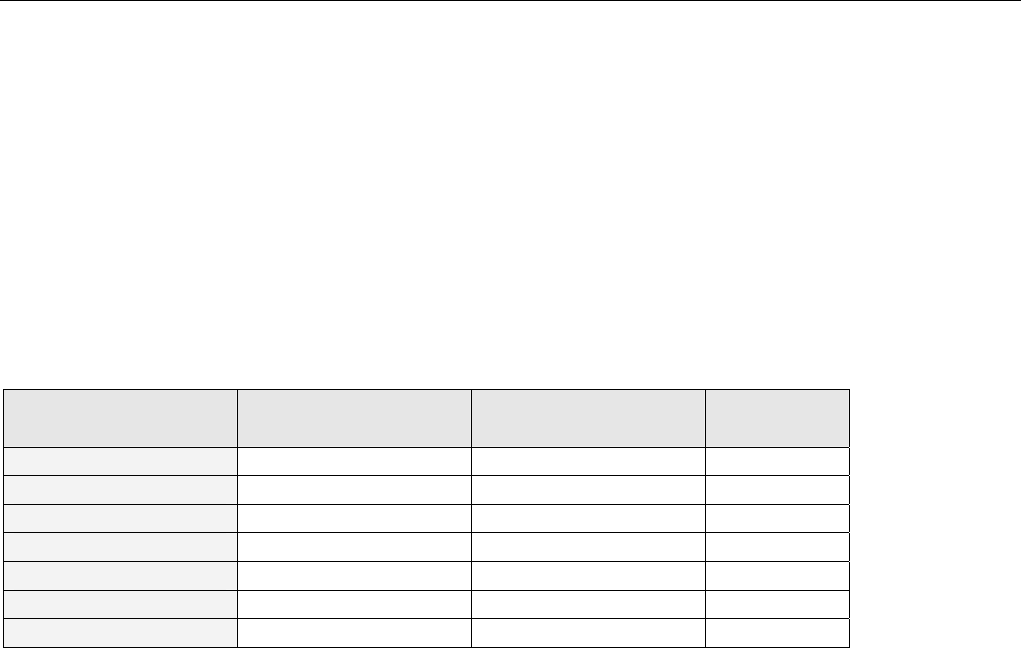
Operating System Ethernet interface USB interface Notes
Win95 Supported Not Supported 1, 2
Win98 Supported Supported 2
Win98, 2nd ed. Supported Supported 2
WinME Supported Supported 2
Win 2000 Supported Supported 2, 4
Win NT 3.0/4.0 Supported Not Supported 2, 4
Win XP Supported Supported 3, 4
Note 1: USB was not supported in t
ote 2: Internet Explorer 3.0 or hig
ote 3: Requires Service Pack 1
ote 4: To load the Ripwave M e
privileges.
SB Interface
he USB Modem allows for a single PC to be connected to the Ripwave Modem via a USB interface, or
ultiple PC’s connected via a USB hub. The Modem conforms to USB 1.1 standards. The Ethernet
PC a e encapsulated within the USB protocol and transferred to the Modem.
t ove ows 98,
, Windows 2000
o install the Modem using a insert the
D that comes with the mode g the
SB Miniport driver, the PC e type of Operating
ystem and the particular installation. The system will prompt if a reboot is necessary.
ow install the Ripwave Mon the PC
fter installing or uninstalling n.
his software release
her is required N
N
N onitor or Navini Diagnostics software, the user MUST have Administrativ
U
T
m
packets generated by the
The packets are then sen
Windows ME
r
r-the-air. The USB Modem is fully supported for PC’s using Wind
, and Windows NT 5.0.
USB interface, you must connect the Modem to the PC first and
m in the package to load the USB “Miniport” driver. After installin
may or may not need to be restarted, depending upon th
T
C
U
S
N itor or Navini Diagnostics software. You must ALWAYS reboot
this software. Failure to do may gravely affect PC operatioa
Part #40-00097-00 Rev F v1.0
May 21, 2004
39