
User's Guide


Table Of Contents
- Introduction
- Package Inventory
- Ripwave Models
- Minimum Computing Requirements
- Physical Characteristics
- Installing an Ethernet Modem
- Installing a USB Modem
- Accessing the Internet
- Troubleshooting
- Installing Ripwave Monitor
- TroubleshootingUsing Ripwave Monitor
- Uninstalling Ripwave Monitor
- Installing Navini Diagnostics (NavDiag)
- TroubleshootingUsing Navini Diagnostics (NavDiag)
- Uninstalling Navini Diagnostics
- Installing & Charging the Battery
- Care & Maintenance
- Upgrading the Modem
- ADDENDUM 1: Ripwave™ Modem - PC Troubleshooting
- ADDENDUM 2: End User Software License Agreement
Ripwave Modem User Guide Navini Networks, Inc.
Ethernet Interface
The E
onnec
ave a mix of devices, such as Unix machines, Apple Computers, etc. IP
SB or
ubs. Doing so may cause Riwpave Monitor software not to operate.
Ba
Older Ripwave Modems gave the user the option of buying an 1800 mA Li-Ion battery. With the optional
b he user could be conn Internet an here ther F coverage without
t er outlet. Th ttery was ra e 30 minutes to 90 minutes of use
without recharging (depending on activity).
Configuration Options
thernet Modem may be connected to a PC via an Ethernet connection. Also, it is possible to
t multiple PC devices to a single Modem. The multi-PC configuration is transparent to the PCc
users and is analogous to a multi-PC configuration on a normal Ethernet LAN. The distinct advantage of
e Ethernet Modem is that it connects to any device that has an Ethernet interface. This makes it ideal th
for small businesses that h
addresses can be assigned to the devices dynamically via a DHCP server, or as Fixed IP assignments, or
Point-to-Point Protocol Over Ethernet (PPPoE).
Routers & Hubs
The Ripwave Monitor software will not work if going through a router or if going through some U
thernet hE
ttery
attery, t ected to the ytime and anyw e is R
he need for a pow e Modem ba ted to provid
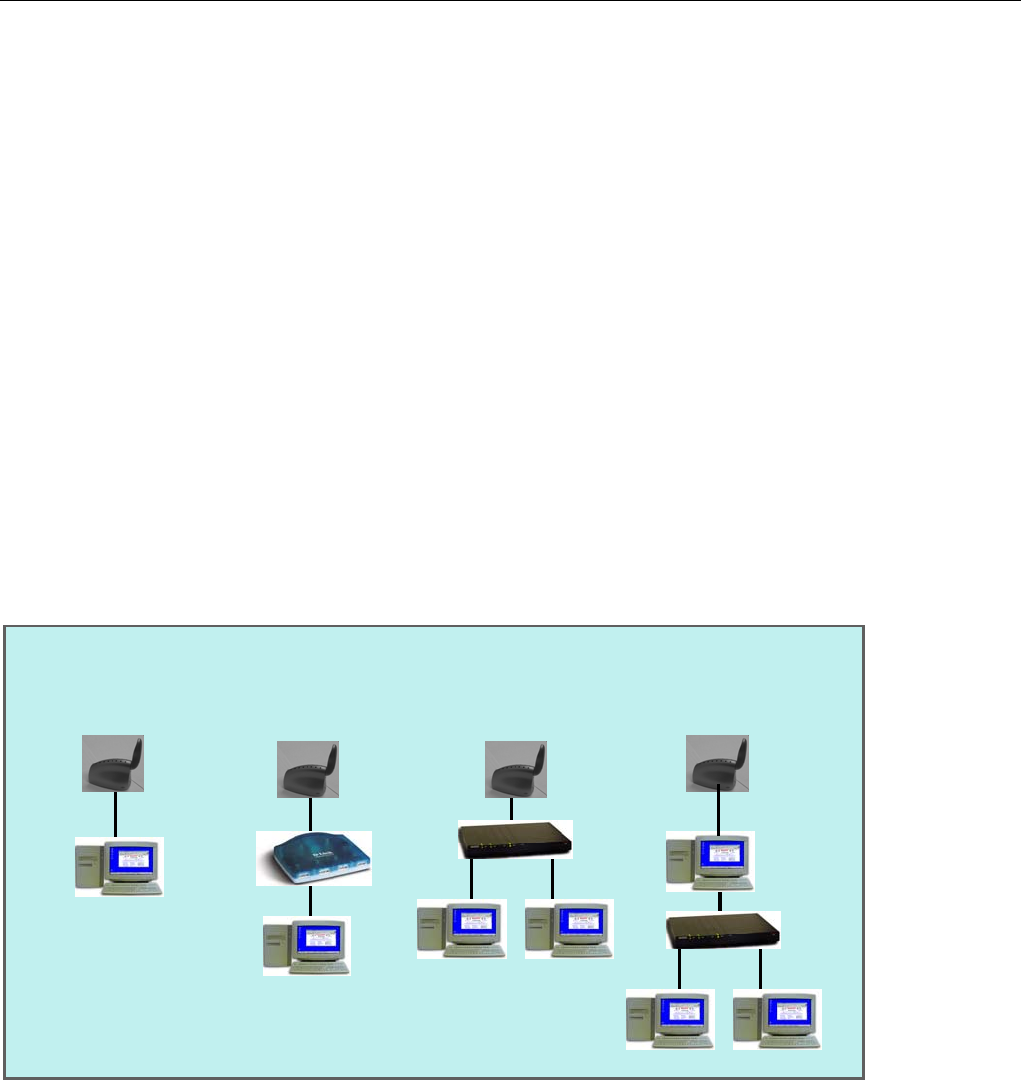
Host Computer used
as router to a network
(USB or Ethernet)
Modem shown as Modem connected to
one of many devices
on a USB hub
a single computer
(USB or Ethernet)
Modem providing
the Internet
hernet HUB
access to
a an Etvi
Host Computer used
as router to a network
(USB or Ethernet)
Modem shown as Modem connected to
Modem providing
the Internet
hernet HUB
a single computer
(USB or Ethernet)
one of many devices
on a USB hub
access to
a an Etvi
Part #40-00097-00 Rev F v1.0
May 21, 2004
40